<?xml version="1.0" encoding="utf-8"?><feed xmlns="http://www.w3.org/2005/Atom" ><generator uri="https://jekyllrb.com/" version="4.4.1">Jekyll</generator><link href="https://kanfu-panda.github.io/feed.xml" rel="self" type="application/atom+xml" /><link href="https://kanfu-panda.github.io/" rel="alternate" type="text/html" /><updated>2026-06-20T23:47:34+00:00</updated><id>https://kanfu-panda.github.io/feed.xml</id><title type="html">功夫熊猫的博客</title><subtitle>一个热爱技术的开发者的个人博客</subtitle><entry xml:lang="en"><title type="html">Your AI feels slow? Maybe it’s not dumb—you’re making it work one thing at a time</title><link href="https://kanfu-panda.github.io/blog/2026/06/20/parallel-agents.html" rel="alternate" type="text/html" title="Your AI feels slow? Maybe it’s not dumb—you’re making it work one thing at a time" /><published>2026-06-20T00:00:00+00:00</published><updated>2026-06-20T00:00:00+00:00</updated><id>https://kanfu-panda.github.io/blog/2026/06/20/parallel-agents</id><content type="html" xml:base="https://kanfu-panda.github.io/blog/2026/06/20/parallel-agents.html"><![CDATA[<p>For a while I’d watch the AI work and quietly grumble: a fairly big task, and it would finish one module before starting the next, while I just sat there waiting for it to clear one before the other’s turn came up. The work itself was fine—it was just slow. Slow because it was stuck in a queue.</p>

<p>Then it clicked: a lot of these modules have nothing to do with each other, so why make them go one after another? Split them up, let several agents work at the same time, done.</p>

<h2 id="what-i-want-and-where-it-stops">What I want, and where it stops</h2>

<p>What I want is simple: the same work, for roughly the same tokens, with the wall-clock time cut way down.</p>

<p>But let me put the boundary up front—<strong>not every task can be split this way</strong>. This is just an approach I’ve worked out for myself; take what’s useful.</p>

<h2 id="the-prerequisite-a-clean-architecture">The prerequisite: a clean architecture</h2>

<p>For several agents to work at once without stepping on each other, the prerequisite isn’t the AI—it’s your <strong>architecture</strong>.</p>

<p>That task of mine could be split because it was already several modules, talking to each other through interfaces, with internal implementations that don’t affect one another—as long as each one honors the interface contract, it can be built independently. Loosely coupled, highly cohesive, in other words. And I’d nailed that design down together with opus before writing a line: opus helps me think it through and lays out options, but <strong>I’m the one who decides</strong>.</p>

<p>You can’t cut corners here. Forcing parallelism onto an architecture you haven’t cleanly split is like cutting a tangle of yarn into a few pieces that are all still knotted together—it only gets messier.</p>

<h2 id="who-runs-the-show-who-plans-who-does-the-work">Who runs the show, who plans, who does the work</h2>

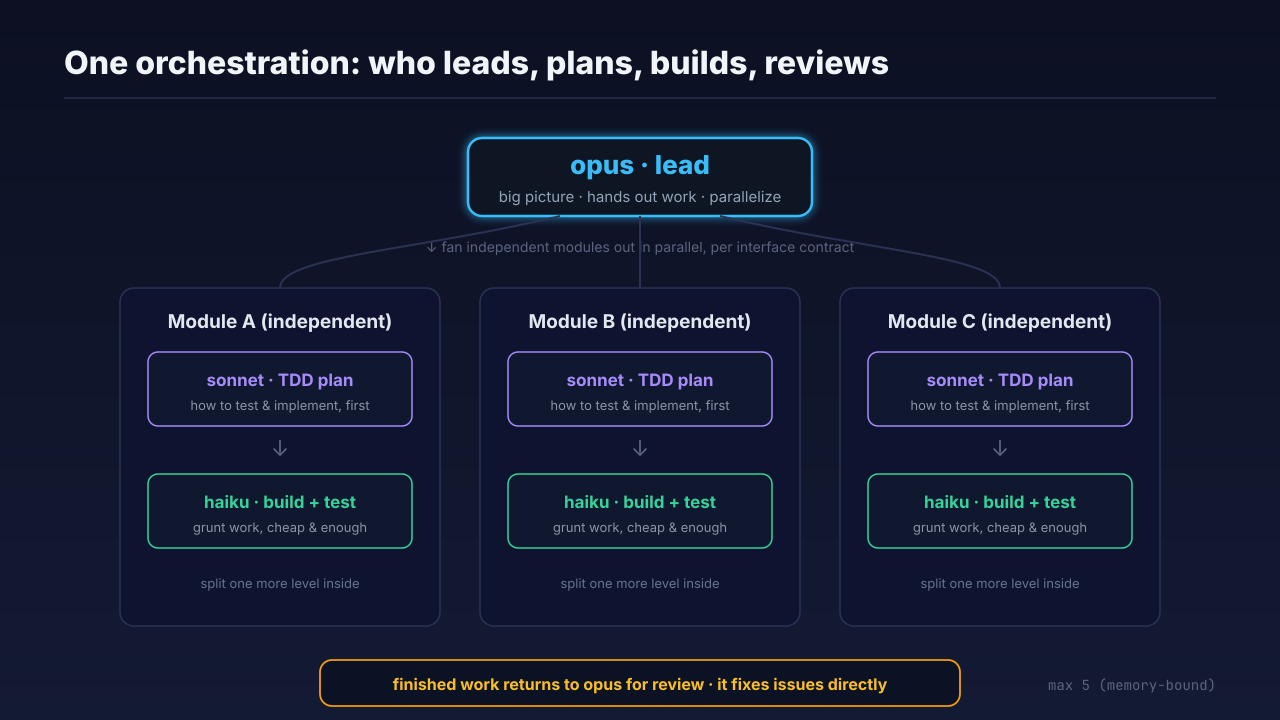
<p>With the design settled, it’s time to assign roles. The split I tend to use:</p>

<ul>
  <li><strong>opus runs the show</strong>—holds the big picture, hands out work, does the final check;</li>
  <li><strong>sonnet does the TDD planning</strong>—per the design, it lays out how each module gets tested and implemented;</li>
  <li><strong>haiku writes the code and runs the tests</strong>—the grunt work goes to it, cheap and good enough.</li>
</ul>

<p>This split is really a continuation of last post’s “model tiering”—use the good steel on the blade. Except last time the point was saving money; this time it’s about how these roles <strong>work together</strong>.</p>

<p><img src="/assets/images/posts/parallel-agents-fig-orchestration-en.png" alt="Orchestration: opus runs the show on top, fanning independent modules out to sonnet (planning) and haiku (implementation + tests); within a module it can split work further; finished work comes back to opus for review" /></p>

<h2 id="how-you-fan-them-out">How you fan them out</h2>

<p>In practice, I did three things:</p>

<ol>
  <li><strong>Wrote one line into the global CLAUDE.md</strong>: “Parallelize when you can.” That’s the default rule across all projects.</li>
  <li><strong>Set the max number of concurrent subagents in Claude’s settings</strong>—that’s the valve that actually matters.</li>
  <li><strong>Added one reminder every time I give an instruction</strong>: “Parallelize as much as possible.” opus, as the lead, already fans work out on its own, but a nudge keeps it on track.</li>
</ol>

<p>The lead hands modules down, and inside a module it can split the work one more level. Layer over layer, and the whole task spreads out.</p>

<h2 id="the-review-step-you-dont-skip">The review step you don’t skip</h2>

<p>Running fast in parallel—how do you keep quality up? My answer: <strong>let the lead review its own output</strong>.</p>

<p>The logic is direct: it handed out the work, so it knows exactly what each subagent owes. Having it do the checking is the natural fit. I tried setting up a separate dedicated review agent, and it just had to re-understand the whole task from scratch—burning another round of tokens and being slower for it. The lead reviewing itself saves that re-understanding overhead, and it’s both faster and sharper.</p>

<p>There’s a small detail after a problem turns up: the lead usually asks me, “Should I fix this directly, or spin up another agent to do it?” I almost always say “you fix it.” Because it’s the one that just caught the flaw—it knows best where the problem is, and the change is most direct coming from it.</p>

<h2 id="the-two-pits-i-fell-into">The two pits I fell into</h2>

<p><strong>The first was memory.</strong> Early on I got greedy and set max concurrency to 10. But I had other projects running in parallel at the time, and the machine’s memory got eaten clean. So I honestly dropped it to 5, and it was actually better—for this one task alone, 5 in parallel is roughly 5× a serial run; stack on the other tasks running at the same time and the overall speedup tops 10×. If your machine and your quota can take it, push the number higher; if not, don’t force it.</p>

<p><strong>The second: don’t split for the sake of splitting.</strong> Some modules are tightly coupled and meant to go in order, and if you pry them apart to parallelize, the agents interfere with each other and quality goes out the window. So before handing it off, I add a specific reminder: “These modules are coupled—don’t force a split.” Good news is plenty of AIs recognize this themselves and won’t force it. When something genuinely can’t be split, just hand it to one agent to do serially, or have the lead run that thread end to end.</p>

<h2 id="a-counterintuitive-bit-of-math">A counterintuitive bit of math</h2>

<p>Plenty of people hear “5 agents burning at once” and their first reaction is: won’t the tokens multiply?</p>

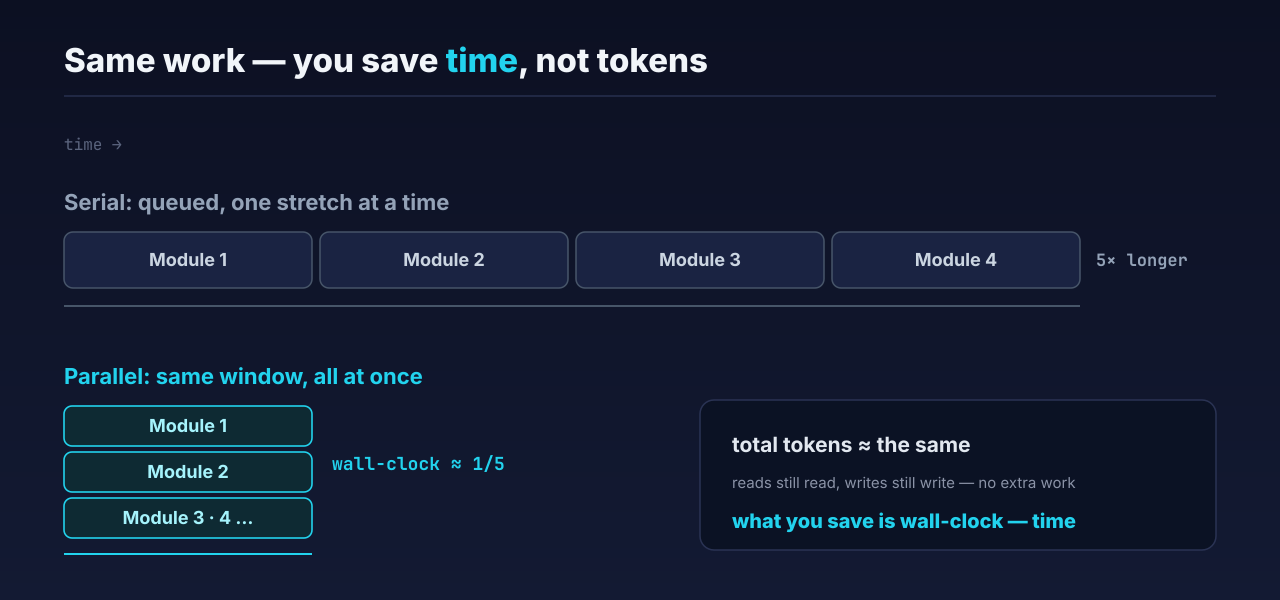
<p>The way I figure it, no. <strong>The same pile of work, done serially, burns roughly the same token count</strong>—what needs reading still gets read, what needs writing still gets written; parallelism doesn’t conjure up extra work. What parallelism actually changes isn’t the cost, it’s the <strong>wall-clock</strong>: the stretches that used to run in a queue now run in the same window together. The tiny bit of extra tokens buys a big drop in time cost—a great trade.</p>

<p><img src="/assets/images/posts/parallel-agents-fig-parallel-en.png" alt="Serial vs parallel: the same work, total tokens roughly equal, but parallel cuts the wall-clock to about 1/5—what you save is time, not spend" /></p>

<p>So apart from the things that genuinely can’t be split, these days I parallelize basically everything that can be.</p>

<h2 id="recap-three-things-to-just-do">Recap: three things to just do</h2>

<p>One, <strong>clean architecture first, then talk parallelism</strong>. Loosely coupled, highly cohesive, talking through interface contracts—without that foundation, splitting is a disaster. Nail it down with the AI in the design phase.</p>

<p>Two, <strong>parallelize everything you can, but set a ceiling</strong>. Bigger isn’t better; size it against your machine’s memory and your AI quota. I went from 10 back to 5 because memory taught me a lesson.</p>

<p>Three, <strong>fast parallelism needs review</strong>. And the reviewer has to actually understand the task—have the lead that handed out the work do the checking, cheapest and sharpest; when it finds a problem, let it fix it directly.</p>

<p>One thing you can do today: open your global CLAUDE.md, add “parallelize when you can,” then go into settings and bump max concurrent subagents to a number your machine can handle. Next time you hand it a task that can be split, you’ll notice it stops queuing.</p>

<p>Next post I want to get into a problem that follows right on the heels of this one: when several agents edit code at the same time, what keeps them from clobbering each other? The answer is git worktree—giving each agent its own isolated workspace so they each work their own copy and nobody gets in anybody’s way. Let me know in the comments if you’re interested.</p>]]></content><author><name></name></author><category term="blog" /><category term="claudecode" /><category term="ai" /><category term="subagents" /><category term="parallelism" /><category term="productivity" /><summary type="html"><![CDATA[Last post was about making the AI work cheaper. This one's about making it work faster—a big task, instead of letting the AI grind through one module at a time, split it and fan it out to several agents at once. The counterintuitive bit: running in parallel doesn't really save tokens. What it saves is time.]]></summary><media:thumbnail xmlns:media="http://search.yahoo.com/mrss/" url="https://kanfu-panda.github.io/assets/images/posts/parallel-agents-cover-en.png" /><media:content medium="image" url="https://kanfu-panda.github.io/assets/images/posts/parallel-agents-cover-en.png" xmlns:media="http://search.yahoo.com/mrss/" /></entry><entry xml:lang="zh"><title type="html">AI 干活太慢？可能不是它笨，是你让它一个一个来</title><link href="https://kanfu-panda.github.io/blog/2026/06/20/parallel-agents.zh.html" rel="alternate" type="text/html" title="AI 干活太慢？可能不是它笨，是你让它一个一个来" /><published>2026-06-20T00:00:00+00:00</published><updated>2026-06-20T00:00:00+00:00</updated><id>https://kanfu-panda.github.io/blog/2026/06/20/parallel-agents.zh</id><content type="html" xml:base="https://kanfu-panda.github.io/blog/2026/06/20/parallel-agents.zh.html"><![CDATA[<p>前段时间我盯着 AI 干活，心里琢磨：一个挺大的任务，它一个模块写完再写下一个，我就在旁边干等，等它跑完这个再轮到那个。活儿其实没问题，就是慢——慢在它一直在排队。</p>

<p>后来我想明白一件事：很多模块之间本来就不相干，凭什么要它们一个接一个来？拆开，让几个 agent 同时干，不就完了。</p>

<h2 id="我想要的和它的边界">我想要的，和它的边界</h2>

<p>我要的很简单：同样一件活、花同样的 token，把完成时间大幅缩短。</p>

<p>但得先把边界说在前头——<strong>不是所有任务都能这么拆</strong>。这篇讲的是我自己摸索出来的一套做法，仅供参考。</p>

<h2 id="拆得动的前提架构先得干净">拆得动的前提：架构先得干净</h2>

<p>要让几个 agent 互不打架地同时干活，前提不在 AI，在你的<strong>架构</strong>。</p>

<p>我那个任务能拆，是因为它本身就是好几个模块，彼此通过接口通信，内部实现互不影响——只要照着接口契约来，每一块都能独立完成。说白了就是松耦合、高内聚。这套东西，是我在动手前就和 opus 一起把设计敲定下来的：opus 帮我理、出方案，<strong>拍板的人是我</strong>。</p>

<p>这一步偷不得懒。架构没拆干净就硬上并行，等于把一团乱麻剪成好几段，每段还连着，结果只会更乱。</p>

<h2 id="分工谁主控谁规划谁动手">分工：谁主控、谁规划、谁动手</h2>

<p>设计定了，接下来是排兵布阵。我习惯的分工是这样：</p>

<ul>
  <li><strong>opus 当主控</strong>，统揽全局、派活、最后把关；</li>
  <li><strong>sonnet 做 TDD 规划</strong>，按设计把每个模块要怎么测、怎么实现的路子先铺好；</li>
  <li><strong>haiku 负责写代码和跑测试</strong>，粗活累活交给它，便宜又够用。</li>
</ul>

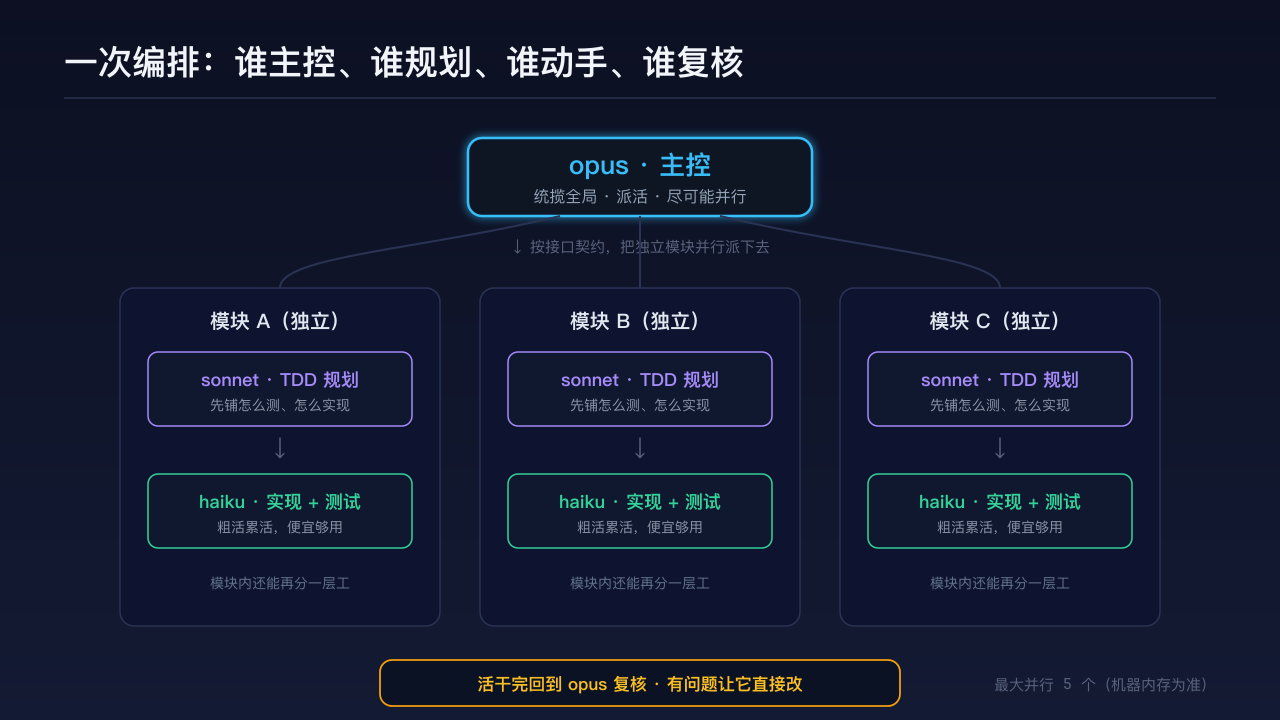
<p>这套分工其实是上一篇”模型分层”的延续——好钢用在刀刃上。只不过上一篇讲的是省钱，这一篇讲的是这几个角色怎么<strong>配合着一起干</strong>。</p>

<p><img src="/assets/images/posts/parallel-agents-fig-orchestration.png" alt="编排结构：opus 主控在上，往下把独立模块派给 sonnet 规划、haiku 实现，模块内还能再分工；活干完回到 opus 手里复核" /></p>

<h2 id="怎么把它们撒出去">怎么把它们撒出去</h2>

<p>具体落地，我做了三件事：</p>

<ol>
  <li><strong>全局 CLAUDE.md 里写死一句</strong>：”能并行就并行。”这是给所有项目定的默认规矩。</li>
  <li><strong>在 Claude 的设置里调最大并行 subagent 数</strong>——这是那个真正管用的”上限阀门”。</li>
  <li><strong>每次发指令时再多嘱咐一句</strong>：”尽可能并行。”虽然 opus 作为主控自己也会并行派活，但你点一句，它心里更有数。</li>
</ol>

<p>主控把模块派下去，模块内部它还能再分一层工。一层套一层，整个任务就铺开了。</p>

<h2 id="复核这道不能省">复核这道，不能省</h2>

<p>并行跑得快，质量怎么保证？我的做法是——<strong>让主控自己来复核</strong>。</p>

<p>道理很直接：活是它派出去的，每个 subagent 该交什么它一清二楚，由它来检查最顺手。我试过另设一个专门的复核 agent，反而要它从头把任务再理解一遍，多烧一遍 token、还更慢。主控自己复核，省了这道重新理解的开销，又快又准。</p>

<p>复核出问题之后还有个小细节：主控通常会问我一句”这个我直接改掉，还是另起一个 agent 来改？”我一般都回”你直接改”。因为它就是刚才挑出毛病的人，最清楚问题在哪，改起来最直接。</p>

<h2 id="我踩过的两个坑">我踩过的两个坑</h2>

<p><strong>第一个是内存。</strong>一开始我贪心，把最大并行设成了 10 个。结果那会儿手头还并行着别的项目，机器内存一下就被吃干净了。后来我老老实实降到 5 个，反倒清爽——单看这一个任务，5 个并行差不多就是串行的 5 倍效率；再叠上同时在跑的其他任务，整体提速能到 10 倍以上。机器和额度够，这个数还能往上加；不够，就别硬撑。</p>

<p><strong>第二个是别为了拆而拆。</strong>有的模块之间耦合很重，本来就该顺着来，你非要把它掰开并行，几个 agent 互相影响，质量根本兜不住。所以交给 AI 之前我会专门嘱咐一句：”这些模块相互有耦合，不要强行拆分。”好在不少 AI 自己也能识别出来，不会硬拆。真碰上拆不动的，就老老实实交给一个 agent 串行做，或者干脆主控自己一条线做完。</p>

<h2 id="一个反直觉的账">一个反直觉的账</h2>

<p>很多人一听”并行 5 个 agent 同时烧 token”，第一反应是：那 token 不得翻几倍？</p>

<p>我自己算下来不是这么回事。<strong>同样这堆活，你串行做，token 也得消耗差不多的量</strong>——该读的还得读，该写的还得写，并行并没有凭空多干什么。并行真正改变的不是花费，是<strong>周期</strong>：本来要排着队跑完的几段，现在压在同一段时间里一起跑完了。多烧的那一点点 token，换来的是时间成本大幅下降，这买卖太划算。</p>

<p><img src="/assets/images/posts/parallel-agents-fig-parallel.png" alt="串行 vs 并行：同样四段活，串行排着队一段段跑完，周期很长；并行压在同一段时间里齐发，周期砍到约 1/5——但两边读写的 token 总量其实差不多。并行省的是时间，不是花费" /></p>

<p>所以除了那些实在拆不动的，我现在基本是<strong>能并行的全并行</strong>。</p>

<h2 id="复盘三条照着做">复盘：三条照着做</h2>

<p>一，<strong>架构先拆干净，才谈得上并行</strong>。松耦合、高内聚、按接口契约通信——没有这个底子，拆了也是灾难。设计阶段就和 AI 把它定下来。</p>

<p>二，<strong>能并行就全并行，但记得设上限</strong>。这个数不是越大越好，盯着你机器的内存和 AI 的额度来定。我从 10 退到 5，就是被内存教育过的。</p>

<p>三，<strong>高速并行，必须配复核</strong>。而且复核的那个得真懂任务——让派活的主控自己来查，最省也最准；查出问题，就让它直接改。</p>

<p>今天读完就能做的一件事：打开你的全局 CLAUDE.md，加一句”能并行就并行”，再去设置里把最大并行 subagent 数调到一个你机器扛得住的值。下次再丢给它一个能拆的大任务，你会发现它不再排队了。</p>

<p>下一篇我想接着聊一个紧跟着冒出来的问题：几个 agent 同时改代码，凭什么互不打架？这背后靠的是 git worktree——给每个 agent 一块独立的工作区，各改各的，谁也别碍着谁。感兴趣的话评论区告诉我。</p>]]></content><author><name></name></author><category term="blog" /><category term="并行" /><category term="subagent" /><category term="ClaudeCode" /><category term="多Agent编排" /><category term="AI编程" /><summary type="html"><![CDATA[上一篇讲怎么让 AI 干活更省。这篇讲怎么让它干得更快——一个大任务，与其让 AI 一个模块一个模块串着做，不如拆开撒给好几个 agent 同时上。关键的反直觉点是：并行并不比串行省多少 token，省下来的是时间。]]></summary><media:thumbnail xmlns:media="http://search.yahoo.com/mrss/" url="https://kanfu-panda.github.io/assets/images/posts/parallel-agents-cover.png" /><media:content medium="image" url="https://kanfu-panda.github.io/assets/images/posts/parallel-agents-cover.png" xmlns:media="http://search.yahoo.com/mrss/" /></entry><entry xml:lang="en"><title type="html">AI getting dumber the longer you chat? It’s not the model—time to take control</title><link href="https://kanfu-panda.github.io/blog/2026/06/18/tier-models-trim-context.html" rel="alternate" type="text/html" title="AI getting dumber the longer you chat? It’s not the model—time to take control" /><published>2026-06-18T00:00:00+00:00</published><updated>2026-06-18T00:00:00+00:00</updated><id>https://kanfu-panda.github.io/blog/2026/06/18/tier-models-trim-context</id><content type="html" xml:base="https://kanfu-panda.github.io/blog/2026/06/18/tier-models-trim-context.html"><![CDATA[<p>One day I had the AI keep building out a feature, and partway through something felt off: replies got slower, it started rambling, it re-asked things I’d already told it, and with the work clearly unfinished it told me “all done, you can take a break now.”</p>

<p>At first I figured the model was just having an off day. Then I looked at the context—it had crept past 80%. I’d been so busy pushing forward I forgot to clear it. Cleared it, asked again, and instantly it was sharp again: fast and on point.</p>

<p>That’s when I started taking this seriously. The last two posts were all about squeezing the volume down <em>before</em> things hit the context—that’s pre-work. This one is about two things you do <em>after</em> you start, mid-session—they decide how many tokens the same work costs, how fast it runs, how stable it stays.</p>

<h2 id="there-are-actually-two-knobs-in-one-conversation">There are actually two knobs in one conversation</h2>

<p>There are two knobs you can turn mid-session, pointing in different directions.</p>

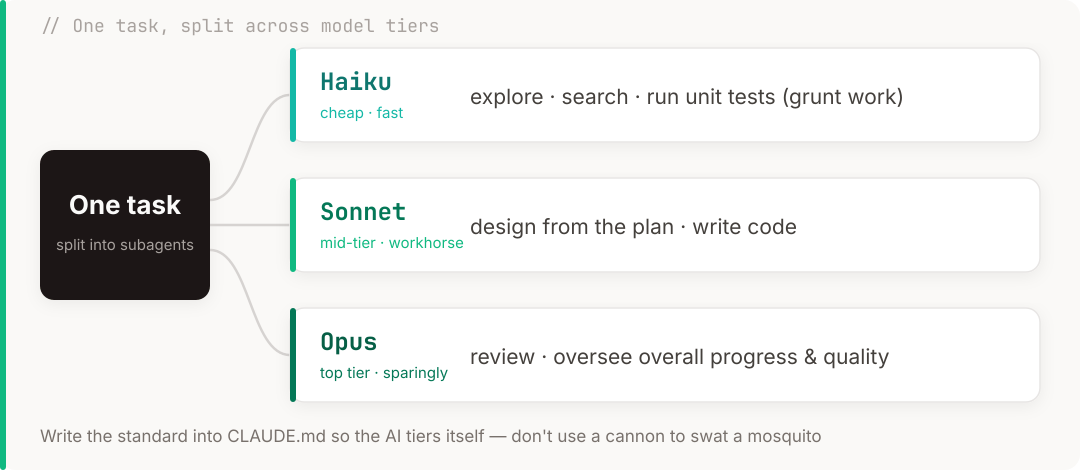
<p>One is horizontal: within a single task, different chunks of work should go to different “brains.” Grunt work like exploring and searching doesn’t need the priciest model; only the parts that genuinely need thinking—writing code, making judgments—are worth putting the good model on. I call this <strong>model tiering</strong>.</p>

<p>The other is vertical: how much you stuff into the same brain at once. The fatter the context, the more the model has to recompute that whole pile every turn—slow, expensive, and error-prone. Managing how fast it grows and when to clear it is <strong>context management</strong>.</p>

<p>What these two save lands in two different places: on pay-as-you-go it’s real cash; on a flat monthly plan it’s quota headroom. I use both, so both moves are a double saving for me. Let me take them one at a time.</p>

<h2 id="dont-put-the-priciest-model-on-all-the-work">Don’t put the priciest model on all the work</h2>

<p>Start with the horizontal one.</p>

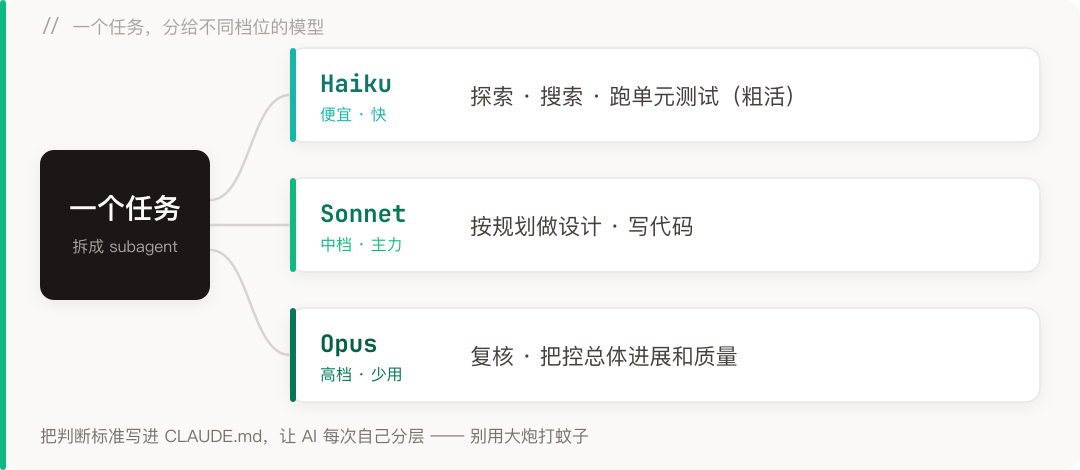
<p>Once I was about to dispatch a batch of subagents on a project, still on pay-as-you-go API billing, and the budget was a bit tight. So I tried a cheapskate move: design-and-code-from-the-plan went to Sonnet, the relatively mechanical unit tests went to the cheaper Haiku, and I left the top model (Opus) to oversee overall progress and quality with a review pass.</p>

<p>It worked surprisingly well. Saved a good chunk of tokens, and it was noticeably faster too—the cheap small models are quick by nature, so handing grunt work to them lightened the whole pipeline. The most expensive compute only got spent where it mattered most.</p>

<p>This split isn’t set in stone. Which work gets which tier, I wrote straight into CLAUDE.md (both user and project level), so the AI tiers itself each time without me assigning by hand. If a step feels especially critical, I can also name a specific model for it on the spot, for more precision. The principle is one line: don’t use a cannon to swat a mosquito—and don’t bring a slingshot to a tank.</p>

<p><img src="/assets/images/posts/tier-models-trim-context-fig-tiering-en.png" alt="Model tiering: one task split horizontally across model tiers—grunt work like exploring, searching, and running unit tests goes to the cheap fast small model; design and code-writing to the mid-tier model; overall oversight and review to the top model, so the most expensive compute only gets spent where it matters most" /></p>

<h2 id="mid-conversation-remember-to-clear-its-head">Mid-conversation, remember to clear its head</h2>

<p>Now the vertical one—the actual culprit behind that “getting dumber” opening.</p>

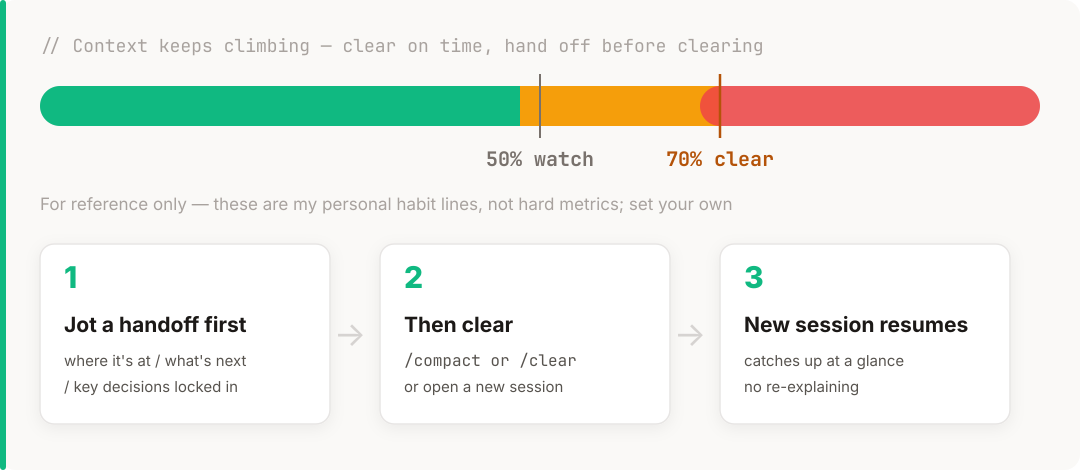
<p>Context just keeps climbing; leave it alone and it keeps getting fatter. My own approach is two lines: around 50% I start paying attention, and by 70% I almost always clear once. The usual rhythm—the moment the task at hand is done, I clear while things are clean, so the next stretch of work travels light, sharp and fast.</p>

<p>To be clear: these two lines, and the “dumber by 80%” from the opening, are just my own feel and habit, not some hard metric. It works for me, but the vendors and other people may not see it this way—you can absolutely set your own pace. I’m only suggesting: don’t just let it climb forever unmanaged.</p>

<p>The clearing step has one trap worth flagging: <code class="language-plaintext highlighter-rouge">/compact</code>, <code class="language-plaintext highlighter-rouge">/clear</code>, or just opening a new session does clean up the context, but done carelessly the model forgets everything it just did, and you’re re-explaining from scratch. My fix—before clearing, have it jot down the current state: where it’s at, what’s next, and which key decisions are already locked in. Write that handoff well before clearing, and the new session catches up at a glance instead of staring blankly.</p>

<p>Honestly, the handoff has basically never failed me so far. On the off chance it doesn’t catch—no panic—I just have it re-analyze, give me a conclusion, and I verify and judge it myself. Small loss.</p>

<p><img src="/assets/images/posts/tier-models-trim-context-fig-context-en.png" alt="Mid-session, clear the context's head: context keeps climbing; at my own warning line (around 50%) I start paying attention, at my clear line (around 70%) I clear once—but these two lines are just my personal habit, for reference only. Before clearing, have it jot a handoff (where it's at / what's next / key decisions), then compact or open a new session, which catches up at a glance" /></p>

<h2 id="a-side-note-read-precisely-carry-less">A side note: read precisely, carry less</h2>

<p>The above is about managing what’s already in. There’s another layer: making what comes in small and precise to begin with.</p>

<p>I’ve got tools like codegraph and claude-mem running on these projects. In short, they take the AI from “read the source cover to cover, scan everything” to “hit just the core bits, pick up the memory saved from prior sessions”—scan less, and what enters the context naturally slims down.</p>

<p>I’m only mentioning this in passing, not unpacking it. For one, unpacking the details turns into a sales pitch; for two, these aren’t the only such tools out there—there may well be better ones I just haven’t used and don’t know about. If you know a handy one, use it; the idea carries over: let the model read precisely, and it won’t have to haul so much along.</p>

<h2 id="a-few-honest-words">A few honest words</h2>

<p>Saving is saving, but I should state the limits, or this turns into another all-good-news piece.</p>

<p>The worry people have most with model tiering: won’t the small model get things wrong? It will. But I left the top model on a final review pass, so the small model’s occasional slip-up mostly gets caught there—no big errors so far. The catch is you can’t skip that review: skip it, and the tokens you saved with tiering eventually get paid back.</p>

<p>Same on the context side: clear too often, write the handoff too sloppily, and you’ll still lose things. So I don’t clear mindlessly on a timer—I pick a clean moment right after a task wraps, and jot the handoff while I’m at it. The point of saving tokens is to cut the real waste, not to cut the memory that should travel along.</p>

<h2 id="recap-three-things-to-just-do">Recap: three things to just do</h2>

<p>What you can actually act on here is three:</p>

<p>One, don’t put the priciest model on all the work. Hand grunt work (exploring, searching, running tests) to a cheap small model, spend the good steel on writing code and making judgments, and keep a top tier on the final review. Write the standard into CLAUDE.md so the AI tiers itself.</p>

<p>Two, don’t let context climb forever. Set yourself a line—mine is 50% attention, 70% clear, yours can be your own; clear once whenever a task wraps, don’t wait until it’s bloated and dumb.</p>

<p>Three, before clearing, have it write a handoff. Where it’s at, what’s next, key decisions—write it down before you compact or open a new session, and the relay won’t drop.</p>

<p>One thing you can do today after reading this: open your CLAUDE.md, hard-code a few rules for “which model does which work,” and set yourself a context red line you clear past. The two together take under ten minutes, but every conversation after that keeps saving for you.</p>

<p>Next time I want to talk about prompts themselves—the same task, said differently, comes out at noticeably different quality; plus how to orchestrate multiple agents working together. If you’re interested, let me know in the comments.</p>]]></content><author><name></name></author><category term="blog" /><category term="claudecode" /><category term="ai" /><category term="tokens" /><category term="context" /><category term="productivity" /><summary type="html"><![CDATA[The last two posts were about saving tokens before things hit the context. This one's about two things you do mid-session—one decides who does the work (model tiering), the other decides how much memory it carries (context management). When the AI gets dumber as you go, it's usually not the model.]]></summary><media:thumbnail xmlns:media="http://search.yahoo.com/mrss/" url="https://kanfu-panda.github.io/assets/images/posts/tier-models-trim-context-cover-en.png" /><media:content medium="image" url="https://kanfu-panda.github.io/assets/images/posts/tier-models-trim-context-cover-en.png" xmlns:media="http://search.yahoo.com/mrss/" /></entry><entry xml:lang="zh"><title type="html">AI 越聊越笨？不是模型菜，是需要上点手段了</title><link href="https://kanfu-panda.github.io/blog/2026/06/18/tier-models-trim-context.zh.html" rel="alternate" type="text/html" title="AI 越聊越笨？不是模型菜，是需要上点手段了" /><published>2026-06-18T00:00:00+00:00</published><updated>2026-06-18T00:00:00+00:00</updated><id>https://kanfu-panda.github.io/blog/2026/06/18/tier-models-trim-context.zh</id><content type="html" xml:base="https://kanfu-panda.github.io/blog/2026/06/18/tier-models-trim-context.zh.html"><![CDATA[<p>那天我让 AI 接着写一个功能，写着写着不对劲了：回答越来越慢，话也说得颠三倒四，前面交代过的东西它又问一遍，明明活没干完，它却跟我说”做完了，可以休息一下了”。</p>

<p>我一开始还以为是模型今天状态不好。回头一看上下文，已经撑到 80% 多了——我光顾着往下推，忘了清。清完再问，立刻就顺了，回答又快又在点子上。</p>

<p>那次之后我才认真对待这件事：前两篇我讲的都是怎么在”进上下文之前”把量压下去，那是开工前的事；这篇要讲的是开工之后、一场会话进行当中的两件事——它们决定了同样的活，你花多少 token、跑多快、稳不稳。</p>

<h2 id="同一场对话里其实有两个旋钮">同一场对话里，其实有两个旋钮</h2>

<p>会话进行中能动的旋钮有两个，方向不一样。</p>

<p>一个是横向的：一个任务里，不同的活该交给不同的”脑子”。探索、搜索这种粗活，没必要上最贵的模型；真正要动脑子写代码、做判断的地方，才值得把好模型派上去。这件事我叫它<strong>模型分层</strong>。</p>

<p>另一个是纵向的：同一个脑子，一次到底塞多少东西进去。上下文越胖，模型每一轮都要把这一大坨重新算一遍，又慢又贵，还容易出岔子。管住它涨多快、什么时候清，这件事是<strong>上下文管理</strong>。</p>

<p>这两件事省下来的，落点也分两头：按量计费时省的是真金白银，包月时省的是额度窗口。我两种都在用，所以这两招对我是双份的划算。下面分开说。</p>

<h2 id="别让最贵的模型干所有的活">别让最贵的模型干所有的活</h2>

<p>先说横向那个。</p>

<p>有一次我在一个项目里准备派一批 subagent 干活，当时还是走 API 按量计费，预算有点紧。我索性试了个穷办法：按规划做设计、生成代码这部分交给 Sonnet，单元测试这种相对机械的活丢给更便宜的 Haiku，最后留高级模型（Opus）把控总体进展和质量，做一次复核。</p>

<p>结果出乎意料地好。token 省了不少，速度还明显快了一截——便宜的小模型本来就跑得快，粗活交给它，整条流水线都轻了。最值钱的算力只花在最该花的地方。</p>

<p>这套分法不是死的。哪种活配哪档模型，我直接写进了 CLAUDE.md（用户级、项目级都有），让 AI 每次自己照着分，不用我每回手动指派。要是某个环节我觉得特别关键，也可以临时点名让某个模型专门来做，更精准。原则就一句：别用大炮打蚊子，也别拿弹弓去轰坦克。</p>

<p><img src="/assets/images/posts/tier-models-trim-context-fig-tiering.png" alt="模型分层：一个任务横向拆给不同档位的模型——探索/搜索/单元测试这类粗活交给便宜快的小模型，设计/写代码交给中档模型，总体把控和复核交给高级模型，最贵的算力只花在最该花的地方" /></p>

<h2 id="聊到一半记得给它清清脑子">聊到一半，记得给它清清脑子</h2>

<p>再说纵向那个，也就是开头那场”降智”的正主。</p>

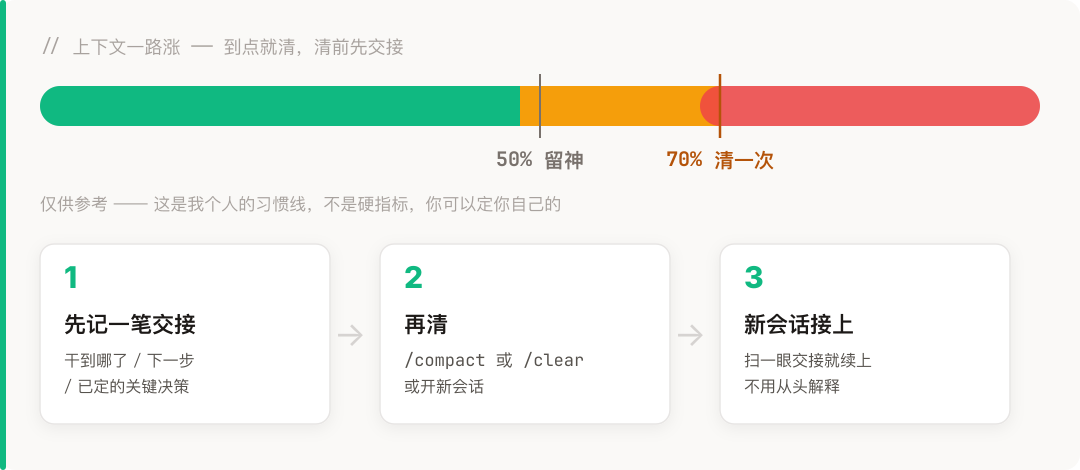
<p>上下文这东西会一路往上涨，你不管它，它就一直胖下去。我自己的做法是给它设了两条线：到 50% 左右我就开始留神，到了 70% 基本就一定清一次。通常的节奏是——手头这项任务一做完，就趁着干净利落清理一遍，让接下来的工作尽量轻装上阵，又准又快。</p>

<p>要说清楚的是，这两条线、还有开头说的”80% 就降智”，都只是我自己的体感和操作习惯，不是什么硬指标。我这么用着顺手，但厂家和别人未必这么看，你完全可以按自己的节奏来。我只是建议：别让它一直涨上去不管。</p>

<p>清理这一步有个坑，必须提一句：<code class="language-plaintext highlighter-rouge">/compact</code>、<code class="language-plaintext highlighter-rouge">/clear</code> 或者干脆开个新会话，确实能让上下文清爽，但弄不好大模型会把之前干的事忘得一干二净，你又得从头解释。我的办法是——清之前，先让它把当前的工作情况记一笔：干到哪了、下一步要做什么、有哪些已经定下来的关键决策。把这段交接写好了再清，新会话上来扫一眼就能接上，不至于一脸懵。</p>

<p>说实话这招我用到现在，接力基本没翻过车。万一真有一次接不上，也不慌——让它重新分析一遍、给我一个结论，我自己验证判断一下就是了，损失不大。</p>

<p><img src="/assets/images/posts/tier-models-trim-context-fig-context.png" alt="会话进行中给上下文'清清脑子'：上下文一路往上涨，到我自己设的警示线（50% 左右）就开始留神，到清理线（70% 左右）就清一次——但这两条线只是我个人的习惯，仅供参考。清理前先让它记一笔交接（干到哪/下一步/关键决策），再 compact 或开新会话，新会话扫一眼就能接上" /></p>

<h2 id="顺带一提读得准才带得少">顺带一提：读得准，才带得少</h2>

<p>上面说的是”已经进来的东西怎么管”。其实还有一层是”让进来的东西本身就少而准”。</p>

<p>我这几个项目里都挂着 codegraph 和 claude-mem 这类工具。简单说，它们让 AI 从”一上来就读源码、全文扫一遍”变成”直接命中核心那几段、续上之前几次会话攒下的记忆”——少扫一大圈，进上下文的东西自然就瘦了。</p>

<p>这里我只是顺带提一下、不展开。一来细节展开就成了给工具站台；二来这类工具市面上未必只有这两个，没准还有更好用的，只不过我没用上、不知道而已。你知道趁手的，照用就行，思路是相通的：让模型读得准，它就不用带那么多东西上路。</p>

<h2 id="几句实话">几句实话</h2>

<p>省归省，得说清楚边界，不然又成了一篇只报喜的稿子。</p>

<p>模型分层最容易让人担心的是：小模型会不会干错？会的。但我留了高级模型在最后复核这一道，小模型偶尔出点岔子，基本都能在复核时兜住，到现在没出过特别大的错。前提是这道复核不能省——省了它，分层省下来的 token 迟早赔进去。</p>

<p>上下文那边也一样：清得太勤、交接写得太潦草，照样会丢东西。所以我不是”到点就无脑清”，而是挑一个任务刚做完、最干净的时间点清，顺手把交接记好。省 token 的本意是砍掉真正的浪费，不是把该带的记忆也一起砍了。</p>

<h2 id="复盘三条照着做就行">复盘：三条照着做就行</h2>

<p>这篇能落地的就三条：</p>

<p>一，别用最贵的模型干所有活。把粗活（探索、搜索、跑测试）分给便宜的小模型，好钢用在写代码和做判断上，留一档高级模型在末尾复核。判断标准写进 CLAUDE.md，让 AI 自己分。</p>

<p>二，别让上下文一直涨。给自己定条线——我是 50% 留神、70% 必清，你可以定你自己的；一个任务做完就清一次，别等它撑到开始降智才动手。</p>

<p>三，清之前先让它写一段交接。干到哪、下一步、关键决策，记好了再 compact 或开新会话，接力就不会断。</p>

<p>你今天读完就能做的一件事：打开你的 CLAUDE.md，把”什么活用什么模型”写死成几条规则；再给自己定一条上下文红线，超了就清。两件事加起来不到十分钟，但接下来每一场对话都在替你省。</p>

<p>下一篇我想聊聊提示词本身——同样一件事，话怎么说，AI 干出来的成色差很多；以及多个 agent 怎么编排着一起干活。感兴趣的话评论区告诉我。</p>]]></content><author><name></name></author><category term="blog" /><category term="token" /><category term="ClaudeCode" /><category term="模型分层" /><category term="上下文管理" /><category term="AI编程" /><summary type="html"><![CDATA[前两篇都在讲怎么在'进上下文之前'省 token。这篇讲会话进行中的两件事——一个决定谁来干活（模型分层），一个决定带多少记忆干活（上下文管理）。AI 写着写着变笨，多半不是模型菜。]]></summary><media:thumbnail xmlns:media="http://search.yahoo.com/mrss/" url="https://kanfu-panda.github.io/assets/images/posts/tier-models-trim-context-cover.png" /><media:content medium="image" url="https://kanfu-panda.github.io/assets/images/posts/tier-models-trim-context-cover.png" xmlns:media="http://search.yahoo.com/mrss/" /></entry><entry xml:lang="en"><title type="html">AI coding getting pricier? I cut my tokens by 82% (with real data)</title><link href="https://kanfu-panda.github.io/blog/2026/06/17/cut-tokens-82.html" rel="alternate" type="text/html" title="AI coding getting pricier? I cut my tokens by 82% (with real data)" /><published>2026-06-17T00:00:00+00:00</published><updated>2026-06-17T00:00:00+00:00</updated><id>https://kanfu-panda.github.io/blog/2026/06/17/cut-tokens-82</id><content type="html" xml:base="https://kanfu-panda.github.io/blog/2026/06/17/cut-tokens-82.html"><![CDATA[<p>Last time I said: saving tokens isn’t about cutting docs, it’s about using your tools right. Someone followed up: so how exactly do you use them right?</p>

<p>This one’s hands-on, with real numbers. Here’s the headline figure: I checked my local <code class="language-plaintext highlighter-rouge">rtk gain</code>—a tool that tracks token savings—and across six thousand-plus commands, it’s saved <strong>7.4 million tokens, 82%</strong>. Not an estimate. It logged them one by one.</p>

<p>So let me break it down: how that 82% gets saved.</p>

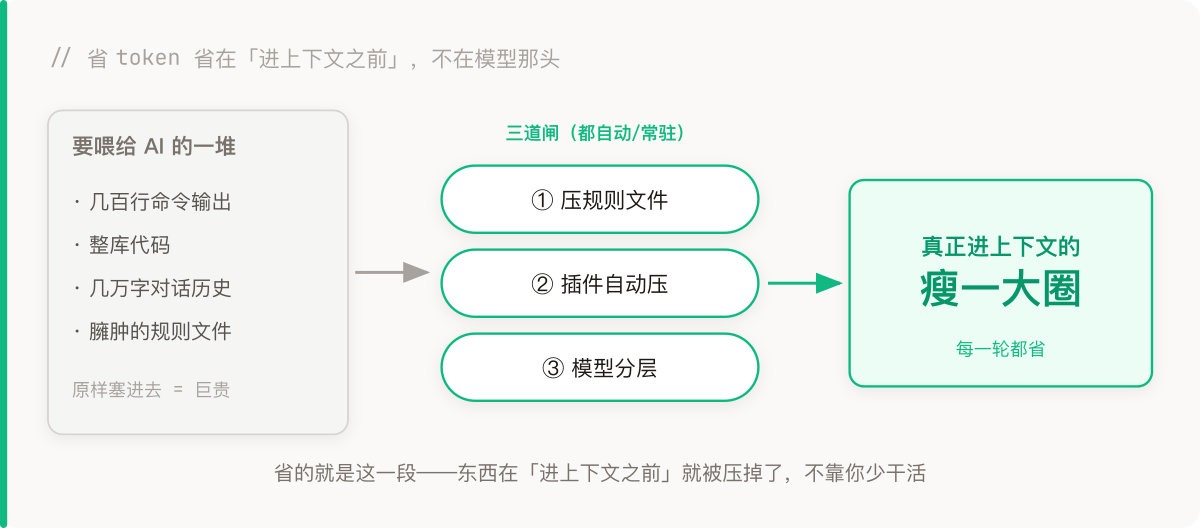
<h2 id="saving-tokens-happens-before-things-hit-the-context">Saving tokens happens “before things hit the context”</h2>

<p>First, where the saving happens.</p>

<p>The bulk of token spend isn’t in “how much work you do”—it’s in how much you stuff into the AI’s context each turn. The model recomputes the entire context every turn; the fatter the context, the more expensive each turn.</p>

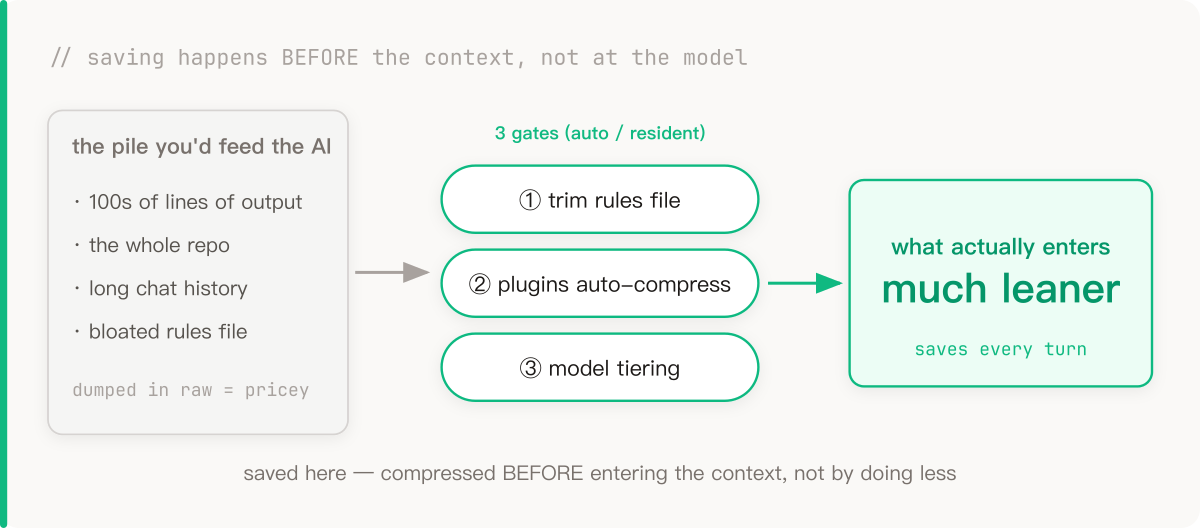
<p>So the core is one sentence: keep what enters the context as small and as lean as possible.</p>

<p>I’ve got three levers: trim the rules file, use the right plugins, tier your models. They share one thing—<strong>they all save before things hit the context, not by making you do less work</strong>. Let’s take them one at a time.</p>

<p><img src="/assets/images/posts/cut-tokens-82-fig-pipeline-en.png" alt="Saving tokens happens before things hit the context: the pile you'd feed the AI (hundreds of lines of command output, the whole repo, tens of thousands of tokens of history, a bloated rules file) passes through three gates—trim the rules file, plugins auto-compress, model tiering—so what actually enters the context is much leaner, saving every turn" /></p>

<h2 id="lever-one-slim-down-your-claudemd-first">Lever one: slim down your CLAUDE.md first</h2>

<p>The most overlooked—and the one you should do first—is trimming your <code class="language-plaintext highlighter-rouge">CLAUDE.md</code>.</p>

<p>CLAUDE.md (rules file, instruction file, whatever you call it) gets stuffed into the context every single conversation. It’s always resident. Every line you write, you re-pay in tokens every turn.</p>

<p>My own CLAUDE.md was once long-winded—from user level to project level, packed with reminders. Looking back, it was full of repeated nagging, stale conventions, and a pile of “might as well not have written it” filler. I cut it down by nearly half, keeping only the hard rules I actually use every time. Bottom line: nagging the same point three times won’t make the AI more obedient, it just costs more tokens each turn.</p>

<p>That one move saves every turn. Because it’s resident, you save not once, but every time after.</p>

<p>Conversation context is the same: a window grown to tens of thousands of tokens—clear it when you should, don’t drag the morning’s stuff into the evening to be recomputed every turn.</p>

<h2 id="lever-two-install-plugins-that-do-this-automatically">Lever two: install plugins that do this automatically</h2>

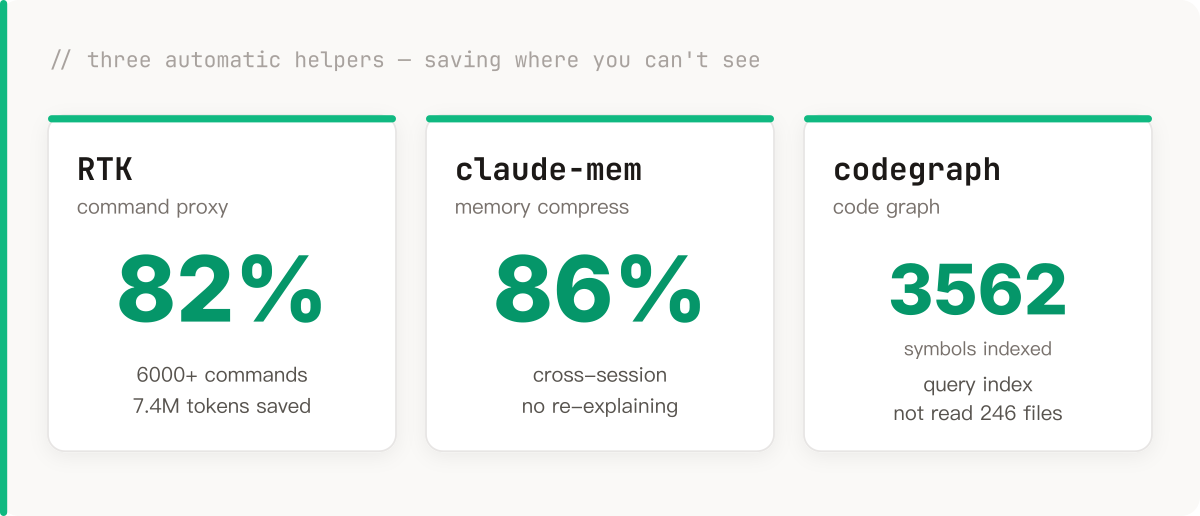
<p>Manual only goes so far. I’ve installed a few plugins that compress the context automatically. The data speaks.</p>

<p><strong>RTK</strong> (Rust Token Killer)—a command proxy. When you have the AI run <code class="language-plaintext highlighter-rouge">git status</code>, <code class="language-plaintext highlighter-rouge">ps aux</code>, or tests, those outputs run hundreds or thousands of lines, and stuffing them in whole is brutally expensive. RTK compresses them before they reach the AI. My <code class="language-plaintext highlighter-rouge">rtk gain</code>: six thousand-plus commands, 7.4M tokens saved, 82%. The biggest wins are the high-frequency, low-nutrition outputs—<code class="language-plaintext highlighter-rouge">ps aux</code>’s hundreds of lines of process list, which the AI gains nothing from reading, saved 99%; test logs 88%; even file reads average 20% off.</p>

<p><strong>claude-mem</strong>—a memory plugin. It compresses cross-session work into structured memory, so you don’t re-explain the project background next time. Measured 86% savings this session. Fully automatic, I barely touch it.</p>

<p><strong>codegraph</strong>—a code graph. It builds an index of the project’s functions, types, and call relationships. When the AI needs a function, it queries the index instead of reading a pile of files. In my aitm project it indexed <strong>246 files, 3562 symbols</strong>. “Query the index” vs. “read 246 files cover to cover”—the difference isn’t small; the former is like flipping to a book’s table of contents, the latter like memorizing the whole book to answer one question.</p>

<p>These three share: automatic, resident, saving before things hit the context. Install them and you mostly forget they’re there—they just keep saving for you.</p>

<p><img src="/assets/images/posts/cut-tokens-82-fig-plugins-en.png" alt="Real measured data for three automatic helpers: RTK command proxy saves 82% (7.4M tokens across 6000+ commands); claude-mem memory compression saves 86% (no re-explaining background across sessions); codegraph code graph indexes 3562 symbols (query the index instead of reading 246 files)" /></p>

<h2 id="lever-three-dont-use-the-priciest-model-for-everything">Lever three: don’t use the priciest model for everything</h2>

<p>Last one: model tiering.</p>

<p>Grunt work—exploring, searching, reading files—goes to a cheap small model; only the real thinking, writing code and making judgments, gets the top tier. Especially when dispatching subagents—one task split into several, the grunt-work ones on small models. This is the main battlefield for saving quota.</p>

<p>I wrote this judgment standard straight into CLAUDE.md, so the AI tiers itself each time without me spelling it out.</p>

<p>This isn’t limited to Claude Code either. On any AI platform the logic holds: know each model’s capability and price, use the right tier for the job, spend the expensive compute where it counts.</p>

<h2 id="one-more-trick-get-the-repeated-parts-discounted">One more trick: get the repeated parts discounted</h2>

<p>The three levers above all “reduce the amount entering the context.” There’s one more, different in kind—prompt caching. It doesn’t reduce the amount; it gets the repeated parts billed at a discount.</p>

<p>System prompts, unchanging rules files, fixed project background—the stuff that’s identical every turn—pays full price the first time, then gets discounted on cache hits. And it’s not a linear discount; used well, the savings are noticeable.</p>

<p>The trick is not to let the cacheable parts keep changing: put the fixed, unchanging stuff at the front of the context and keep it stable, the per-turn variable stuff at the back. The more stable the structure, the higher the cache-hit rate, the fuller the discount.</p>

<p>I don’t have RTK-style measured numbers for this one (it saves on the billing side, not on token count), but the principle is simple and the cost near zero—worth using as a matter of course.</p>

<h2 id="a-few-honest-words-this-isnt-a-free-lunch">A few honest words: this isn’t a free lunch</h2>

<p>Got to state the costs too, or it turns into a promo piece.</p>

<p>codegraph has to build the index first, which takes time on a big project; claude-mem’s memory occasionally recalls things a bit off, so keep an eye out; trimming CLAUDE.md has a limit too—compress away the hard rules you actually need every time, and the AI drifts and reworks, which is penny-wise and pound-foolish.</p>

<p>And don’t mistake “saving tokens” for doing less work. Quite the opposite—it cuts the waste that should’ve been cut: repeated context, reading the whole repo, a cannon for a mosquito. The work that needs doing still gets done.</p>

<p>What the savings mean depends on how you’re billed (covered last time): a flat monthly plan saves quota headroom; pay-as-you-go saves actual cash. I use both, so these methods are a double saving for me.</p>

<h2 id="finally">Finally</h2>

<p>Back to that 82%. It’s no magic trick—it’s piled up from the small things above: trim the rules file, install a few automatic plugins, tier your models. Each looks minor alone; stacked together, it’s 7.4 million tokens saved across six thousand-plus commands.</p>

<p>Two things you can do today, ten minutes to start:</p>

<p>One, open your CLAUDE.md and delete the repeated, the stale, the might-as-well-not-have-written—see how many lines you can cut it to.</p>

<p>Two, install RTK, run it a few days, and look at what its <code class="language-plaintext highlighter-rouge">gain</code> saved you—that number will probably make you do a double take.</p>

<p>That’s all on saving tokens for now. Next I’m thinking of digging into model tiering: how to judge which model does which job, how to write CLAUDE.md so the AI tiers itself. And the details of context management—when to clear, how to read files precisely. If you’re interested, let me know in the comments.</p>]]></content><author><name></name></author><category term="blog" /><category term="claudecode" /><category term="ai" /><category term="tokens" /><category term="productivity" /><summary type="html"><![CDATA[Last time I said saving tokens is about using your tools right, not cutting docs. Someone asked: how exactly? Here's the hands-on version with real numbers — my rtk gain shows 7.4M tokens saved, 82%, across 6000+ commands.]]></summary><media:thumbnail xmlns:media="http://search.yahoo.com/mrss/" url="https://kanfu-panda.github.io/assets/images/posts/cut-tokens-82-cover-en.png" /><media:content medium="image" url="https://kanfu-panda.github.io/assets/images/posts/cut-tokens-82-cover-en.png" xmlns:media="http://search.yahoo.com/mrss/" /></entry><entry xml:lang="zh"><title type="html">AI 编码越用越贵？我把 token 砍掉了 82%（附实测数据）</title><link href="https://kanfu-panda.github.io/blog/2026/06/17/cut-tokens-82.zh.html" rel="alternate" type="text/html" title="AI 编码越用越贵？我把 token 砍掉了 82%（附实测数据）" /><published>2026-06-17T00:00:00+00:00</published><updated>2026-06-17T00:00:00+00:00</updated><id>https://kanfu-panda.github.io/blog/2026/06/17/cut-tokens-82.zh</id><content type="html" xml:base="https://kanfu-panda.github.io/blog/2026/06/17/cut-tokens-82.zh.html"><![CDATA[<p>上一篇我说，省 token 不在砍文档，在把工具用对。有人接着问：那到底怎么用对？</p>

<p>这篇上实测。先甩个数字：我翻了下本地的 <code class="language-plaintext highlighter-rouge">rtk gain</code>——这是个统计 token 节省的工具——六千多条命令，累计省下 <strong>740 万 token，82%</strong>。不是估的，是它一条条记下来的。</p>

<p>这篇就拆开讲：这 82% 是怎么省出来的。</p>

<h2 id="省-token省在进上下文之前">省 token，省在”进上下文之前”</h2>

<p>先说清楚省在哪。</p>

<p>省 token 的大头，不在你”干了多少活”，在每一轮对话往 AI 上下文里塞了多少东西。模型每轮都要把整个上下文重新算一遍——上下文越肥，每一轮越贵。</p>

<p>所以核心就一句话：让进上下文的东西尽量少、尽量精。</p>

<p>我手上三个抓手：压规则文件、用对插件、模型分层。它们有个共性——<strong>都省在”进上下文之前”，不靠你少干活</strong>。下面一个个拆。</p>

<p><img src="/assets/images/posts/cut-tokens-82-fig-pipeline.png" alt="省 token 省在「进上下文之前」：要喂给 AI 的一堆（几百行命令输出、整库代码、几万字对话历史、臃肿规则文件）先过三道闸——压规则文件、插件自动压、模型分层，真正进上下文的瘦一大圈，每一轮都省" /></p>

<h2 id="抓手一先把你的-claudemd-压瘦">抓手一：先把你的 CLAUDE.md 压瘦</h2>

<p>最容易被忽略、又最该先做的，是压你的 <code class="language-plaintext highlighter-rouge">CLAUDE.md</code>。</p>

<p>CLAUDE.md（规则文件、指令文件，叫法不一）是每次对话都会被塞进上下文的东西。它常驻。你写了多少行，每一轮就重复付多少行的 token。</p>

<p>我自己的 CLAUDE.md 一度写得又臭又长，从用户级到项目级，密密麻麻叮嘱了一大堆。后来回头一看，里头全是重复的唠叨、过时的约定，和一堆”写了跟没写一样”的正确废话。狠心砍掉将近一半，只留真正每次都用得上的硬规则。说到底，同一句话叮嘱三遍，AI 也不会更照办，纯是每轮多花 token。</p>

<p>就这一下，每一轮对话都省。因为它常驻，省的不是一次，是往后每一次。</p>

<p>对话上下文同理：一个聊到几万字的窗口，该清就清，别让早上的事拖到晚上还在每轮重算。</p>

<h2 id="抓手二装几个自动干这事的插件">抓手二：装几个自动干这事的插件</h2>

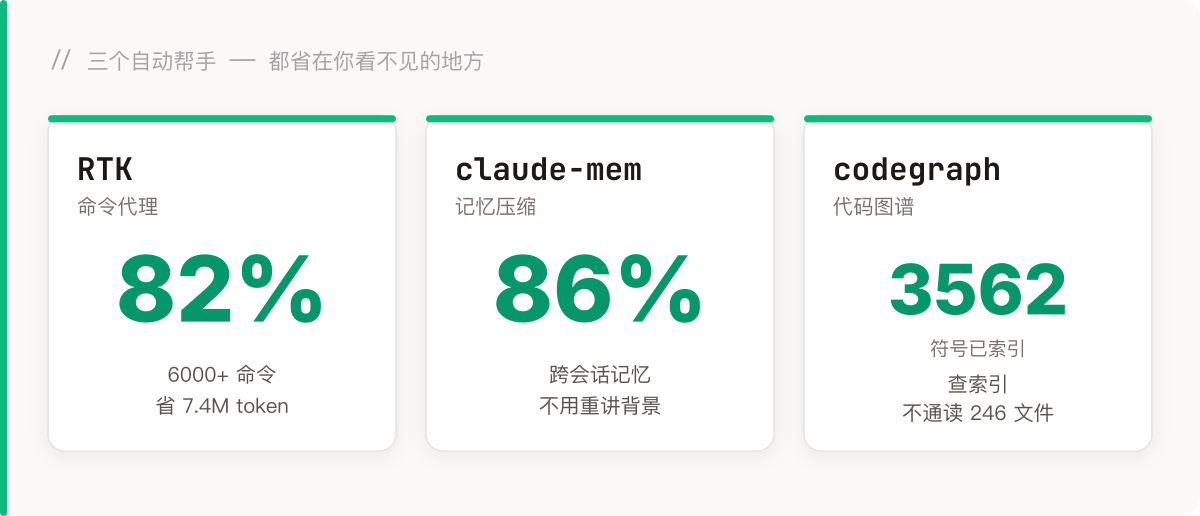
<p>光靠手动还不够。我装了几个自动压上下文的插件，数据说话。</p>

<p><strong>RTK</strong>（Rust Token Killer）——命令代理。你让 AI 跑 <code class="language-plaintext highlighter-rouge">git status</code>、<code class="language-plaintext highlighter-rouge">ps aux</code>、跑测试，那些输出动辄几百上千行，全塞进上下文巨贵。RTK 在输出进 AI 之前就把它压掉。我的 <code class="language-plaintext highlighter-rouge">rtk gain</code>：六千多条命令省了 740 万 token、82%。省得最狠的是那些高频又没营养的输出——<code class="language-plaintext highlighter-rouge">ps aux</code> 几百行的进程列表，AI 看了纯属遭罪，省 99%；测试日志省 88%；连读文件平均也省两成。</p>

<p><strong>claude-mem</strong>——记忆插件。把跨会话的工作压成结构化记忆，下次不用重新跟它解释项目背景。本会话实测省了 <strong>86%</strong>。全自动，基本不用我管。</p>

<p><strong>codegraph</strong>——代码图谱。它给整个项目的函数、类型、调用关系建了个索引。AI 要找某个函数，查索引就行，不用把一堆文件通读一遍。我的 aitm 项目，它索引了 <strong>246 个文件、3562 个符号</strong>。”查索引”和”把 246 个文件从头读一遍”，差的不是一星半点——前者像翻书的目录，后者像为了回答一个问题先把整本书背下来。</p>

<p>这三个的共性：自动、常驻、省在进上下文之前。装好基本就忘了它，它一直在帮你省。</p>

<p><img src="/assets/images/posts/cut-tokens-82-fig-plugins.png" alt="三个自动帮手的实测数据：RTK 命令代理省 82%（六千多条命令累计省 7.4M token）、claude-mem 记忆压缩省 86%（跨会话不用重讲背景）、codegraph 代码图谱索引 3562 个符号（查索引不通读 246 文件）" /></p>

<h2 id="抓手三别用最贵的模型干所有活">抓手三：别用最贵的模型干所有活</h2>

<p>最后一个，模型分层。</p>

<p>探索、搜索、读文件这种粗活，交给便宜的小模型；真正要动脑的写代码、做判断，才上最强那档。尤其派 subagent 的时候——一个任务拆几个子 agent，粗活那些用小模型，这是省额度的主战场。</p>

<p>我把这套判断标准直接写进了 CLAUDE.md，让 AI 每次自己照着分，不用我每回交代。</p>

<p>这事也不限于 Claude Code。换任何 AI 平台，道理一样：摸清每个模型的能力和价钱，该用哪档用哪档，把贵的算力用在刀刃上。</p>

<h2 id="还有一招让重复进去的部分打折">还有一招：让重复进去的部分打折</h2>

<p>前面三个抓手，都是在”减少进上下文的量”。还有一个角度不一样——prompt caching，它不减量，是让重复进去的部分按折扣计费。</p>

<p>系统提示、不变的规则文件、固定的项目背景，这些每轮都一样的东西，第一次进去算全价，之后命中缓存就打折——而且不是线性的折扣，用好了省得明显。</p>

<p>诀窍是别让该缓存的东西老变：固定不变的放上下文前面、稳住，每轮变动的放后面。结构越稳，缓存命中率越高，折扣吃得越满。</p>

<p>这招我没有像 RTK 那样的实测数字（它省在计费这头，不在 token 数量上），但原理简单、几乎零成本，顺手就能用上。</p>

<h2 id="几句实话这不是免费午餐">几句实话：这不是免费午餐</h2>

<p>得把代价也说清楚，不然就成种草文了。</p>

<p>codegraph 要先建索引，项目大了索引也花时间；claude-mem 的记忆偶尔召回得不那么准，得自己留个心眼；压 CLAUDE.md 更有个度——把真正每次都要用的硬规则也压没了，AI 跑偏返工，那是捡芝麻丢西瓜。</p>

<p>还有，别误会”省 token”是让你少干活。恰恰相反，它砍的是”本来就该省的浪费”——重复的上下文、通读整库、大炮打蚊子。活该干的还得干。</p>

<p>省下来意味着什么，得看你怎么计费（上篇讲过）：包月省的是额度窗口，按量省的是真金白银。两种我都在用，所以这些方法对我是双重的省。</p>

<h2 id="最后">最后</h2>

<p>绕回开头那个 82%。它不是什么神技，是上面这些小事垒出来的：压规则文件、装几个自动插件、分层用模型。每一项单看不起眼，叠在一起，就是六千多条命令省下的 740 万 token。</p>

<p>今天你能做两件事，十分钟就能开始：</p>

<p>一，打开你的 CLAUDE.md，把重复的、过时的、写了等于没写的删掉，看看能从多少行压到多少行。</p>

<p>二，装个 RTK，跑几天，看它的 <code class="language-plaintext highlighter-rouge">gain</code> 给你省了多少——那数字大概率会让你愣一下。</p>

<p>省 token 这事我先聊到这。下次想聊聊，模型分层的细节：怎么判断哪个模型该干什么活，怎么写 CLAUDE.md 让 AI 照着分。还有上下文管理的细节，什么时候该清、怎么精准读文件。感兴趣的话，留言告诉我。</p>]]></content><author><name></name></author><category term="blog" /><category term="token" /><category term="Claude Code" /><category term="AI工程" /><category term="成本" /><category term="RTK" /><summary type="html"><![CDATA[上一篇说省 token 靠把工具用对，这篇上实测：我翻了下本地的 rtk gain，六千多条命令省了 740 万 token、82%。拆开讲这 82% 是怎么省出来的——压规则文件、用对插件、模型分层。]]></summary><media:thumbnail xmlns:media="http://search.yahoo.com/mrss/" url="https://kanfu-panda.github.io/assets/images/posts/cut-tokens-82-cover.png" /><media:content medium="image" url="https://kanfu-panda.github.io/assets/images/posts/cut-tokens-82-cover.png" xmlns:media="http://search.yahoo.com/mrss/" /></entry><entry xml:lang="en"><title type="html">Your docs aren’t burning your tokens — your tooling is</title><link href="https://kanfu-panda.github.io/blog/2026/06/16/tokens-not-docs.html" rel="alternate" type="text/html" title="Your docs aren’t burning your tokens — your tooling is" /><published>2026-06-16T00:00:00+00:00</published><updated>2026-06-16T00:00:00+00:00</updated><id>https://kanfu-panda.github.io/blog/2026/06/16/tokens-not-docs</id><content type="html" xml:base="https://kanfu-panda.github.io/blog/2026/06/16/tokens-not-docs.html"><![CDATA[<p>People keep asking me the same thing about running projects with PDLC: with all those docs — PRD, design, review at every step — aren’t you burning tokens like crazy?</p>

<p>It’s a fair question. The process is broken into fine-grained stages, each leaving an artifact behind, and that does look more expensive than just “letting the AI write the code.” But I’d argue you can’t put the token bill on the docs.</p>

<p>Let me put the conclusion up front. First: having lots of docs and burning lots of tokens are two different things. Second: even if you genuinely want to cut tokens, the answer is using your tools correctly, not cutting the docs.</p>

<p>I haven’t measured tokens precisely — I didn’t run the same project twice, with and without docs, to get a clean percentage. What I have is hands-on experience and methods.</p>

<h2 id="the-token-bill-isnt-pdlcs-fault">The token bill isn’t PDLC’s fault</h2>

<p>Before you settle the bill, find the right debtor.</p>

<p>Most of the time, burning tokens isn’t caused by PDLC — it’s tooling used wrong. And “wrong” is concrete, in three places:</p>

<ul>
  <li><strong>Context</strong>: not clearing it when you should. One conversation running from morning to night, tens of thousands of tokens of history recomputed every single turn. You’re asking a new question and paying off old debt.</li>
  <li><strong>Prompts</strong>: too vague. The AI keeps guessing what you actually want; something you could have said once takes three rounds.</li>
  <li><strong>Tool calls</strong>: making it read the whole repo when you’re only changing one file.</li>
</ul>

<p>And the most common one: never turning on the token-saving methods at all, then blaming the process for being heavy.</p>

<p>You can’t charge any of this to “PDLC has too many docs.” Docs sit quietly in <code class="language-plaintext highlighter-rouge">docs/</code> and never burn a single token on their own. What burns tokens is the usage above.</p>

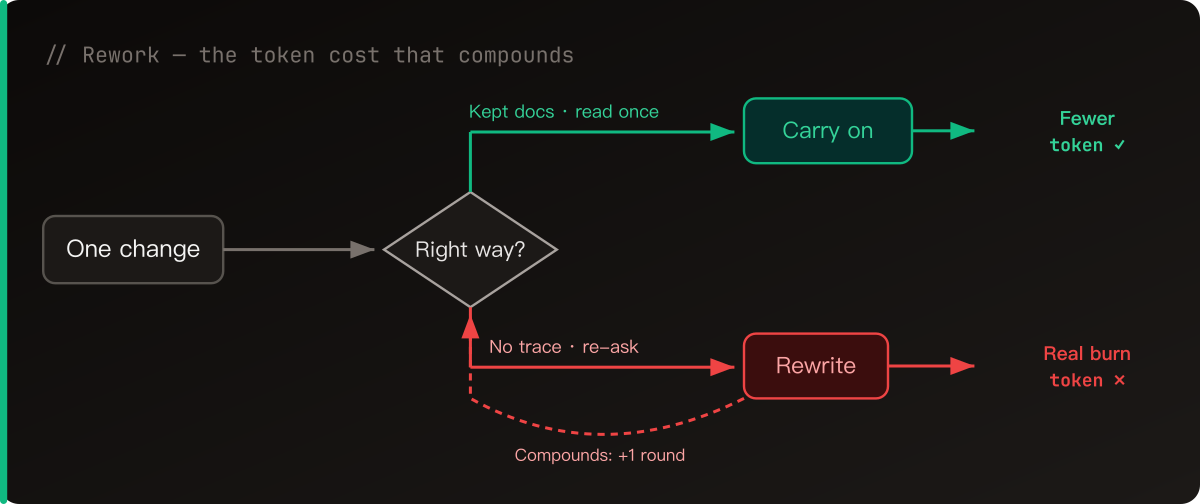
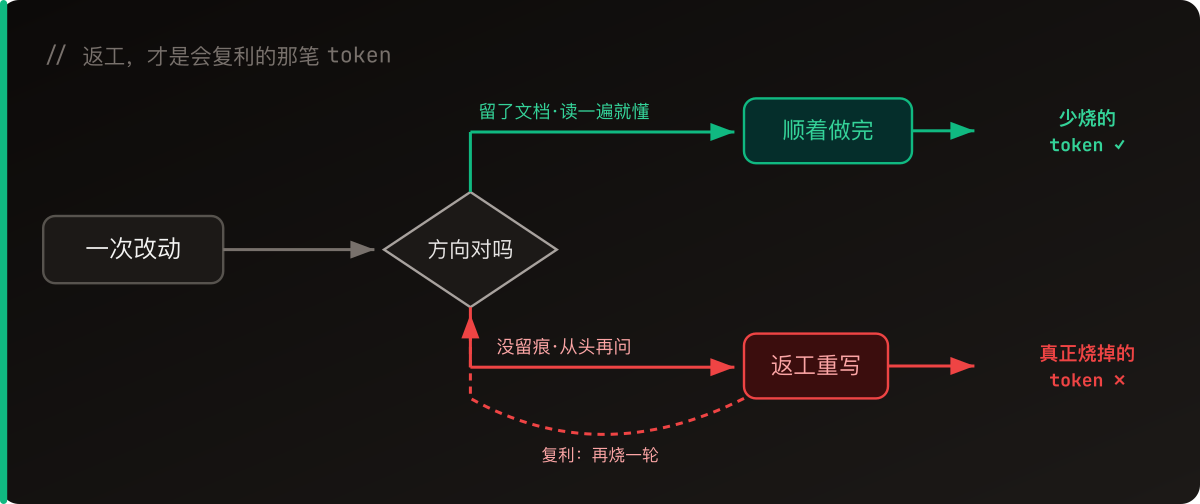
<h2 id="what-actually-burns-tokens-is-rework">What actually burns tokens is rework</h2>

<p>In my own experience, the biggest token sink has never been generating docs — it’s rework.</p>

<p>Rewriting because the direction was wrong, tearing things down because the requirement was misread, going back because fixing one thing broke another — every one of those round-trips is real tokens. Generating a PRD is a one-time cost; rework from a wrong direction compounds.</p>

<p>This heavy-looking PDLC process is precisely trading “write a bit more up front” for “rework a lot less later.” Once you are using it, the whole flow is steadier and so is the final output — no back-and-forth. Less rework is, in itself, fewer tokens burned.</p>

<p>So here is how I see it: docs aren’t a cost, they’re an asset. They leave a trace of the design decisions and the why, so you can trace back and audit. Next time the AI picks it up, it reads the docs and gets it — I don’t re-explain from scratch. That saved stretch is, again, tokens.</p>

<p><img src="/assets/images/posts/tokens-not-docs-fig1-en.png" alt="A change that left docs behind: the AI reads them once and carries on, burning fewer tokens. With no trace, it forces rework and rewrites — and rework compounds, which is what actually burns the tokens" /></p>

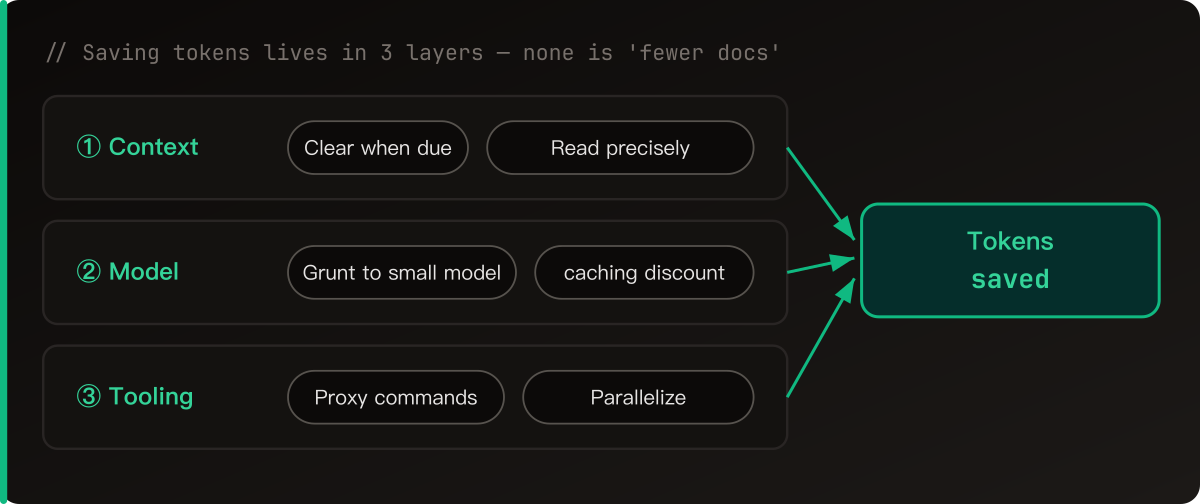
<h2 id="so-where-should-you-actually-save-tokens">So where should you actually save tokens</h2>

<p>Saving tokens isn’t about not writing docs — it’s saving where saving belongs. The ones I actually use on my machine, roughly:</p>

<ul>
  <li><strong>Trim context</strong>: clear it when you should; don’t drag tens of thousands of tokens of history through every turn.</li>
  <li><strong>Tier your models</strong>: don’t use a cannon on a mosquito. Hand the grunt work — exploring, searching, reading files — to a cheap small model; only bring out the strongest tier for the real thinking, analysis and code.</li>
  <li><strong>Read files precisely</strong>: only read what’s relevant to this change; don’t reflexively “read the whole project.”</li>
  <li><strong>Prompt caching</strong>: the cached portion is billed at a discount, and it isn’t a 1:1 linear relationship — used well, the savings are noticeable.</li>
  <li><strong>Put a token proxy in front of routine commands</strong>: for high-frequency ops like <code class="language-plaintext highlighter-rouge">git status</code>, squeeze the output; it adds up.</li>
  <li><strong>Parallelize</strong>: fire off independent work at once, fewer round-trips.</li>
</ul>

<p>Not one of these is “write fewer docs.”</p>

<p><img src="/assets/images/posts/tokens-not-docs-fig2-en.png" alt="Saving tokens lives in three layers — context (clear when you should / read precisely), model (grunt work to a small model / caching discount), and tooling (proxy routine commands / parallelize). Not one is &quot;write fewer docs&quot;" /></p>

<h2 id="not-every-change-needs-the-full-process">Not every change needs the full process</h2>

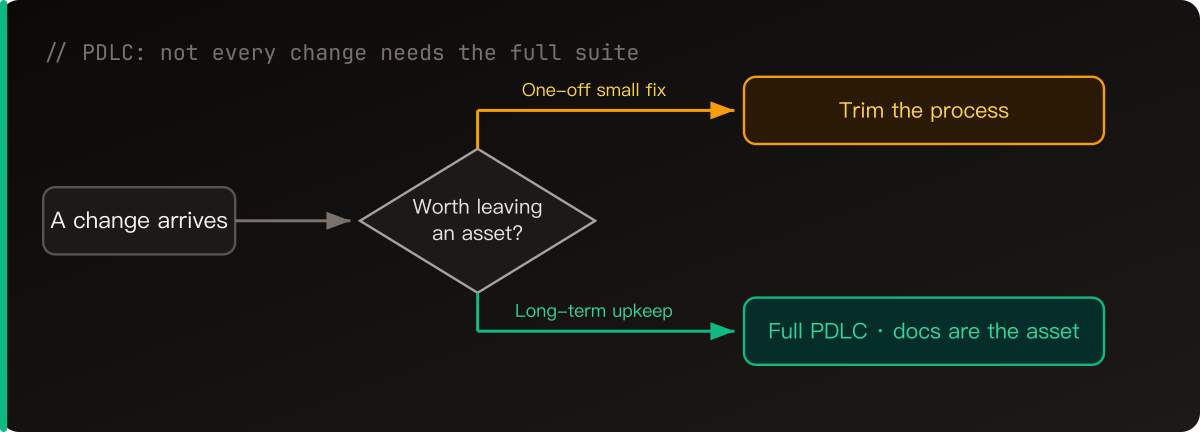
<p>That said, PDLC doesn’t mean running the full suite on every change.</p>

<p>A one-line bug fix — do you need a PRD, a design review? Depends; most of the time there’s no need for the heavy process, so trim it. The criterion is simple: is this change worth leaving an asset for? If yes, run the full thing; for one-off small fixes, nobody blames you for cutting a few steps.</p>

<p>And “saving tokens = saving money” needs to be said per billing model, or it misleads:</p>

<ul>
  <li>On a <strong>flat monthly subscription</strong> with a fixed quota, what you save is <strong>quota headroom</strong> — the same money does more work.</li>
  <li>On <strong>pay-as-you-go API</strong>, you save <strong>actual cash</strong> — every token hits the bill.</li>
</ul>

<p>I use both. Figure out which one you’re on first; that’s what tells you what “saving tokens” actually means for you.</p>

<p><img src="/assets/images/posts/tokens-not-docs-fig3-en.png" alt="PDLC doesn't need the full suite on every change: a one-off small fix trims the process; only something worth maintaining long-term runs full PDLC — and there the docs are the asset" /></p>

<h2 id="finally">Finally</h2>

<p>To sum up: lots of docs doesn’t equal burning tokens; if you really want to save, save on how you use your tools, not on the docs.</p>

<p>The one thing I most want to say: docs are an asset, not a cost. Trying to save tokens by “not writing docs, just letting the AI emit code” looks like savings short-term, but the project won’t go far — no trace, no traceability, and two months later you can’t even say why you designed it this way. The rework then burns far more than the doc tokens you saved.</p>

<p>One thing you can do today: look back at whether you’ve turned on the token-saving methods — is your context trimmed? Are you still sending everything to the strongest model instead of tiering? Did you cut the costs you could? And while you’re at it, ask whether you’re using PDLC well too.</p>

<p>There’s a lot more to unpack on saving tokens — how exactly to tier models, when to clear context, how to actually land the caching discount. I’ll pick one and go deeper next time.</p>]]></content><author><name></name></author><category term="blog" /><category term="claudecode" /><category term="ai" /><category term="tokens" /><category term="workflow" /><summary type="html"><![CDATA[People keep asking: with all those PDLC docs, aren't you burning tokens? Having lots of docs and burning tokens are two different things — and if you want to save tokens, the answer is using your tools right, not cutting docs.]]></summary><media:thumbnail xmlns:media="http://search.yahoo.com/mrss/" url="https://kanfu-panda.github.io/assets/images/posts/tokens-not-docs-cover.png" /><media:content medium="image" url="https://kanfu-panda.github.io/assets/images/posts/tokens-not-docs-cover.png" xmlns:media="http://search.yahoo.com/mrss/" /></entry><entry xml:lang="zh"><title type="html">真正烧 token 的不是文档，是你工具没用对</title><link href="https://kanfu-panda.github.io/blog/2026/06/16/tokens-not-docs.zh.html" rel="alternate" type="text/html" title="真正烧 token 的不是文档，是你工具没用对" /><published>2026-06-16T00:00:00+00:00</published><updated>2026-06-16T00:00:00+00:00</updated><id>https://kanfu-panda.github.io/blog/2026/06/16/tokens-not-docs.zh</id><content type="html" xml:base="https://kanfu-panda.github.io/blog/2026/06/16/tokens-not-docs.zh.html"><![CDATA[<p>用 PDLC 写项目，少不了被问一句：文档一堆，PRD、设计、评审一路下来，token 不烧爆吗？</p>

<p>这问题不是没道理——流程拆得细、每步都留产物，看着确实比”直接让 AI 把代码写出来”费。但要我说，不能把 token 烧得凶这笔账算到文档头上。</p>

<p>先把结论摆前面：第一，文档多和 token 烧得凶，不是一回事；第二，就算真要省 token，办法是把工具用对，而不是把文档砍掉。</p>

<p>我<strong>没</strong>精确测过 token，没拿同一个项目跑两遍”有文档 vs 没文档”的对比，算不出漂亮的百分比。讲的是体感和方法。</p>

<h2 id="烧-token-的锅不在-pdlc">烧 token 的锅，不在 PDLC</h2>

<p>把账算清楚之前，先得找对欠债的。</p>

<p>烧 token 这件事，大多数时候不是 PDLC 带来的，是工具用得不对。这里的”不对”很具体，就三块：</p>

<ul>
  <li><strong>上下文</strong>：该清的不清。一个对话从早开到晚，几万字的历史每一轮都在重算，你问的是新问题，付的是旧账。</li>
  <li><strong>提示词</strong>：写得含糊。AI 来回猜你到底要什么，一次能说清的事，问三轮才对上。</li>
  <li><strong>工具调用</strong>：动不动让它通读整个仓库，其实你只改一个文件。</li>
</ul>

<p>再加一条最常见的：能省 token 的方法压根没用上，然后回头怪流程重。</p>

<p>把这些账不能算到”PDLC 文档多”头上。文档安安静静躺在 <code class="language-plaintext highlighter-rouge">docs/</code> 里，不会主动烧你一个 token；真正烧的是上面这几种用法。</p>

<h2 id="真正烧-token-的是返工">真正烧 token 的，是返工</h2>

<p>我自己用下来，最烧 token 的从来不是生成文档，是返工。</p>

<p>方向错了重写、需求理解偏了推倒、改完这块发现那块连带坏了再回头——这种来回，每一轮都是实打实的 token。生成一份 PRD 是一次性的支出；方向错了返工，是会复利的。</p>

<p>PDLC 这套看着重的流程，恰恰是拿”前面多写一点”换”后面少返工”。用了之后，整体流程稳、最后的产出也稳，不至于来回改。少返工，本身就是少烧 token。</p>

<p>所以我的看法是：文档不是成本，是资产。它把设计决策、为什么这么做都留了痕，可以回溯、可以审计。下次 AI 接手，读一遍文档就懂，不用我从头再讲一遍——这一段省下来的，又是 token。</p>

<p><img src="/assets/images/posts/tokens-not-docs-fig1.png" alt="一次改动若留了文档，AI 读一遍就懂、顺着做完；没留痕就得返工重写，而返工会复利，才是真正烧掉的 token" /></p>

<h2 id="那-token-到底该省在哪">那 token 到底该省在哪</h2>

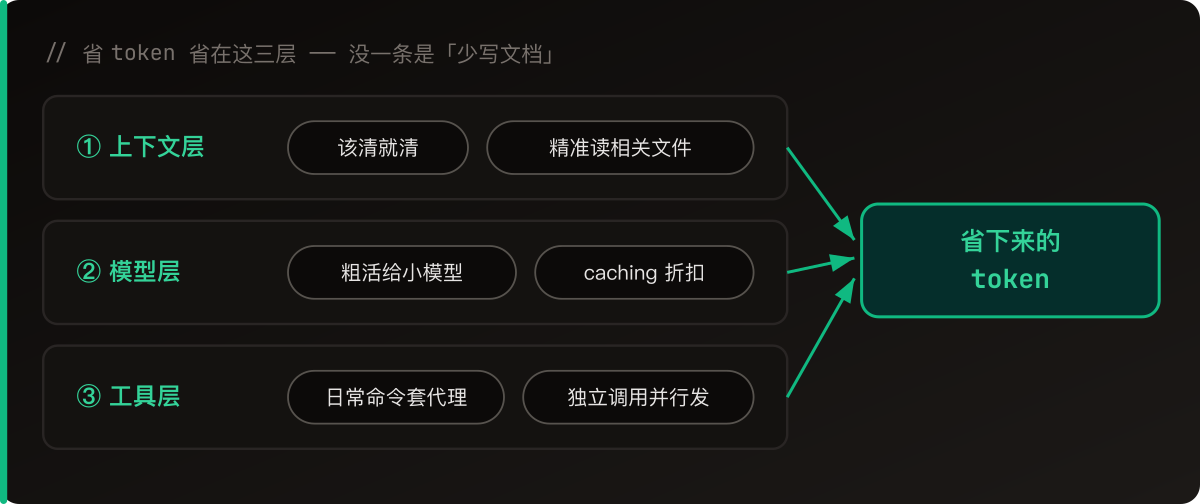
<p>省 token 不是不写文档，是省在该省的地方。我机器上实际在用的，大概这几处：</p>

<ul>
  <li><strong>降上下文</strong>：该清就清，别让一个对话拖着几万字历史硬跑。</li>
  <li><strong>模型分层</strong>：别大炮打蚊子。探索、搜索、读文件这种粗活，交给便宜的小模型；真正要动脑的分析、写代码，才上最强的那档。</li>
  <li><strong>精准读文件</strong>：只读跟这次改动相关的，别张口就”通读整个项目”。</li>
  <li><strong>prompt caching</strong>：能命中缓存的部分按折扣计费，而且不是 1:1 的线性关系，用好了省得明显。</li>
  <li><strong>给日常命令套层 token 代理</strong>：像 <code class="language-plaintext highlighter-rouge">git status</code> 这类高频操作，输出压一压，积少成多。</li>
  <li><strong>并行</strong>：互不依赖的活儿一次发出去，少几轮往返。</li>
</ul>

<p>这几条里，没有一条是”少写文档”。</p>

<p><img src="/assets/images/posts/tokens-not-docs-fig2.png" alt="省 token 省在三层——上下文层（该清就清 / 精准读相关文件）、模型层（粗活给小模型 / caching 折扣）、工具层（日常命令套代理 / 并行），没一条是「少写文档」" /></p>

<h2 id="它不是所有场景都得上满">它不是所有场景都得上满</h2>

<p>话说回来，PDLC 也不是什么改动都得走全套。</p>

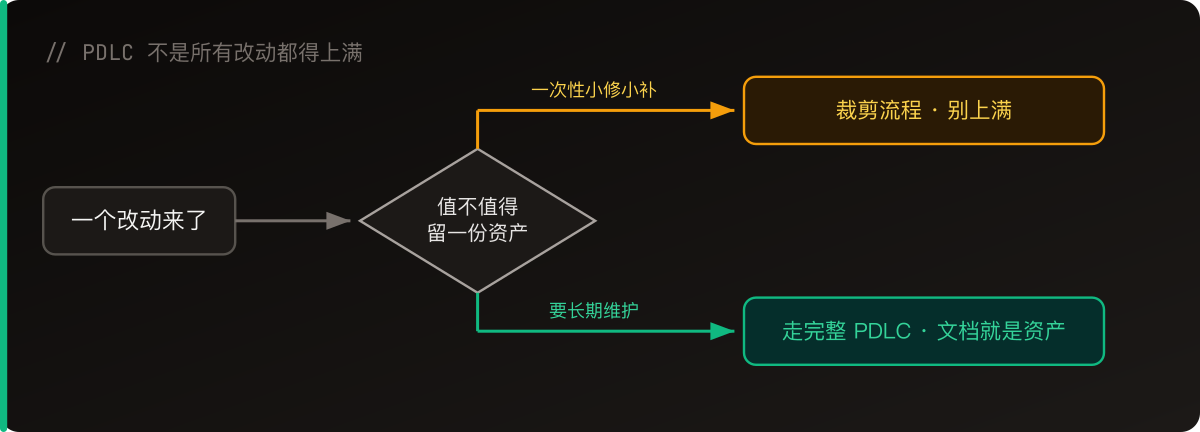
<p>一行小 bug，你要不要 PRD、要不要设计评审？看情况，多数时候没必要走重流程，该简化就简化。判断标准很朴素：这个改动值不值得为它留一份资产。值，就走全套；一次性的小修小补，裁掉几步也没人怪你。</p>

<p>还有”省 token = 省钱”这句，得分计费方式说，不然容易误导人：</p>

<ul>
  <li><strong>包月订阅</strong>那种固定额度的，你省的是<strong>额度窗口</strong>——省下来的 token，让你同样的钱干更多的活。</li>
  <li><strong>按量计费的 API</strong>，你省的是<strong>真金白银</strong>，每个 token 都直接进账单。</li>
</ul>

<p>这两种我都在用。先搞清楚自己是哪一种，才知道”省 token”对你到底意味着什么。</p>

<p><img src="/assets/images/posts/tokens-not-docs-fig3.png" alt="PDLC 不是所有改动都得上满：一次性小修小补就裁剪流程、别上满；要长期维护才走完整 PDLC——这时文档就是资产" /></p>

<h2 id="最后">最后</h2>

<p>总结下，文档多，不等于烧 token；真要省，省在工具用法上，不在文档上。</p>

<p>我最想说的一句：文档是资产，不是成本。想靠”不写文档、直接让 AI 出代码”来省 token，短期看着是省了，项目走不远——没有留痕、没有回溯，过两个月你自己都说不清当初为什么这么设计，那时候的返工，比你省下的那点文档 token 烧得狠多了。</p>

<p>今天能做的一个动作：回头看自己有没有把省 token 的方法用上——上下文降了吗？模型还是一律上最强的，没分层？该省的成本省了吗？顺手再想想，PDLC 你是不是也没用好。</p>

<p>省 token 这事拆开能讲的还有不少，比如模型到底怎么分层、上下文什么时候该清、caching 怎么吃到折扣，下次挑一个聊细一点。</p>]]></content><author><name></name></author><category term="blog" /><category term="PDLC" /><category term="Claude Code" /><category term="AI工程" /><category term="token" /><category term="成本" /><summary type="html"><![CDATA[有人说 PDLC 文档一堆，token 不烧爆吗？我想说文档多和 token 烧得凶不是一回事；真想省 token，办法是把工具用对，不是把文档砍掉。]]></summary><media:thumbnail xmlns:media="http://search.yahoo.com/mrss/" url="https://kanfu-panda.github.io/assets/images/posts/tokens-not-docs-cover.png" /><media:content medium="image" url="https://kanfu-panda.github.io/assets/images/posts/tokens-not-docs-cover.png" xmlns:media="http://search.yahoo.com/mrss/" /></entry><entry xml:lang="en"><title type="html">PDLC 1.1: two things v1.0 got wrong about artifact shape</title><link href="https://kanfu-panda.github.io/blog/2026/06/08/pdlc-v1-1.html" rel="alternate" type="text/html" title="PDLC 1.1: two things v1.0 got wrong about artifact shape" /><published>2026-06-08T00:00:00+00:00</published><updated>2026-06-08T00:00:00+00:00</updated><id>https://kanfu-panda.github.io/blog/2026/06/08/pdlc-v1-1</id><content type="html" xml:base="https://kanfu-panda.github.io/blog/2026/06/08/pdlc-v1-1.html"><![CDATA[<p>Three months after starting a project with PDLC, a team member asked a simple question: “What does the system look like right now?”</p>

<p>There was no good answer. <code class="language-plaintext highlighter-rouge">/pdlc-arch</code> had been run six times. The <code class="language-plaintext highlighter-rouge">docs/02_design/architecture/</code> directory had six timestamped files: <code class="language-plaintext highlighter-rouge">20260112-arch-analysis.md</code>, <code class="language-plaintext highlighter-rouge">20260204-arch-analysis.md</code>, and so on. Each captured the architecture at a point in time. None answered the question as asked — because the question was about <em>current state</em>, not history.</p>

<p>The same thing happened with coding standards. The team ran <code class="language-plaintext highlighter-rouge">/pdlc-standard</code> (in the old form) to update the naming conventions. Instead of editing the existing file, it created <code class="language-plaintext highlighter-rouge">coding-style-v2.md</code>. Then <code class="language-plaintext highlighter-rouge">coding-style-v3.md</code>. By the time someone new joined the project, there were four files covering the same topic, with no obvious canonical one.</p>

<p>These weren’t edge cases. They were a systematic confusion about what kind of artifact you’re writing.</p>

<h2 id="the-design-choice-ledger-vs-surface">The design choice: ledger vs surface</h2>

<p>PDLC v1.0 treated all artifacts the same way: write to a new file with a timestamp or version suffix, and never touch the old ones. This is the right behavior for some artifacts — a PRD records a decision at a point in time, and you don’t want it overwritten when the feature evolves. A PRD is a <em>ledger artifact</em>: append-only, date-addressed, permanent.</p>

<p>But architecture overviews and team conventions aren’t decisions. They’re states. The question they answer isn’t “what did we decide on Feb 4?” but “what is true right now?” For those, append-only is exactly wrong. Every new version compounds the confusion instead of resolving it.</p>

<p>RFC #5 introduced the <strong>ledger/surface split</strong>:</p>

<table>
  <thead>
    <tr>
      <th>Type</th>
      <th>Question answered</th>
      <th>Mutation rule</th>
      <th>Example</th>
    </tr>
  </thead>
  <tbody>
    <tr>
      <td><strong>Ledger</strong></td>
      <td>“What happened at time T?”</td>
      <td>Append-only, never edit in place</td>
      <td>PRD, per-feature design doc, test plan</td>
    </tr>
    <tr>
      <td><strong>Surface</strong></td>
      <td>“What is true right now?”</td>
      <td>In-place edit, git log is the history</td>
      <td><code class="language-plaintext highlighter-rouge">ARCHITECTURE.md</code>, coding standards</td>
    </tr>
  </tbody>
</table>

<p>The rule is enforced at the skill level. <code class="language-plaintext highlighter-rouge">/pdlc-arch</code> is now declared <code class="language-plaintext highlighter-rouge">artifact_type: surface</code> in its frontmatter. Its iron law: <strong>one file, <code class="language-plaintext highlighter-rouge">docs/ARCHITECTURE.md</code>, overwritten every time</strong>. The skill won’t create a dated copy. If it finds legacy <code class="language-plaintext highlighter-rouge">YYYYMMDD-arch-analysis.md</code> files, it moves them to <code class="language-plaintext highlighter-rouge">docs/.archive/architecture/</code> automatically and uses the most recent one as the starting point for the new surface file.</p>

<p>The same principle governs the new <code class="language-plaintext highlighter-rouge">/pdlc-standard</code> skill, which manages <code class="language-plaintext highlighter-rouge">docs/00_standards/</code>. The rule is explicit in the skill definition: <code class="language-plaintext highlighter-rouge">coding-style-v2.md</code> is prohibited. There is one file per topic. The audit trail lives in <code class="language-plaintext highlighter-rouge">git log</code>, not in filename proliferation.</p>

<div class="language-plaintext highlighter-rouge"><div class="highlight"><pre class="highlight"><code>Before v1.1                          After v1.1
─────────────────────────────────    ──────────────────────────────────
docs/02_design/architecture/         docs/
  20260112-arch-analysis.md            ARCHITECTURE.md   ← one file
  20260204-arch-analysis.md              (git log shows full history)
  20260315-arch-analysis.md           .archive/architecture/
  20260428-arch-analysis.md             20260112-arch-analysis.md
  20260519-arch-analysis.md             (legacy files, out of the way)
  20260601-arch-analysis.md
</code></pre></div></div>

<p>The anti-pattern has a name now: “ledger detour” — when a surface artifact gets treated as a ledger because the tooling defaulted to append. Naming it makes it easier to catch.</p>

<h2 id="the-feature-relation-problem">The feature relation problem</h2>

<p>v1.0 introduced per-feature state machines at <code class="language-plaintext highlighter-rouge">docs/.pdlc-state/&lt;feature-id&gt;.json</code>. Feature IDs are flat: <code class="language-plaintext highlighter-rouge">F20260501-01</code>, <code class="language-plaintext highlighter-rouge">F20260501-02</code>, and so on. Each feature tracks its own stages independently.</p>

<p>The problem surfaces when features start depending on each other. You’re changing <code class="language-plaintext highlighter-rouge">F20260501-03</code> (user authentication). Does anything else break? Under v1.0, the only way to know was to read every PRD and hope the author mentioned the dependency. There was no structural answer.</p>

<p>RFC #6 adds the feature relation chain via <code class="language-plaintext highlighter-rouge">/pdlc-relate</code>. Six relation types:</p>

<ul>
  <li><code class="language-plaintext highlighter-rouge">extends</code> — “this feature builds on that one”</li>
  <li><code class="language-plaintext highlighter-rouge">depends_on</code> — “this feature requires that one to function”</li>
  <li><code class="language-plaintext highlighter-rouge">supersedes</code> — “this feature replaces that one”</li>
  <li><code class="language-plaintext highlighter-rouge">resolves</code> — “this feature fixes that defect”</li>
  <li><code class="language-plaintext highlighter-rouge">conflicts_with</code> — “these two features can’t coexist as-is” (symmetric)</li>
  <li><code class="language-plaintext highlighter-rouge">relates_to</code> — “loosely connected, worth knowing” (symmetric)</li>
</ul>

<p>Relations are stored redundantly across five locations: the feature state machine JSON, the document traceability header, a reverse index at <code class="language-plaintext highlighter-rouge">docs/.pdlc-state/_relations.json</code>, and a generated Mermaid graph at <code class="language-plaintext highlighter-rouge">docs/.pdlc-state/_graph.md</code>. The redundancy is intentional — any skill can read from whichever location is most convenient, and <code class="language-plaintext highlighter-rouge">/pdlc-relate validate</code> checks that all five stay consistent.</p>

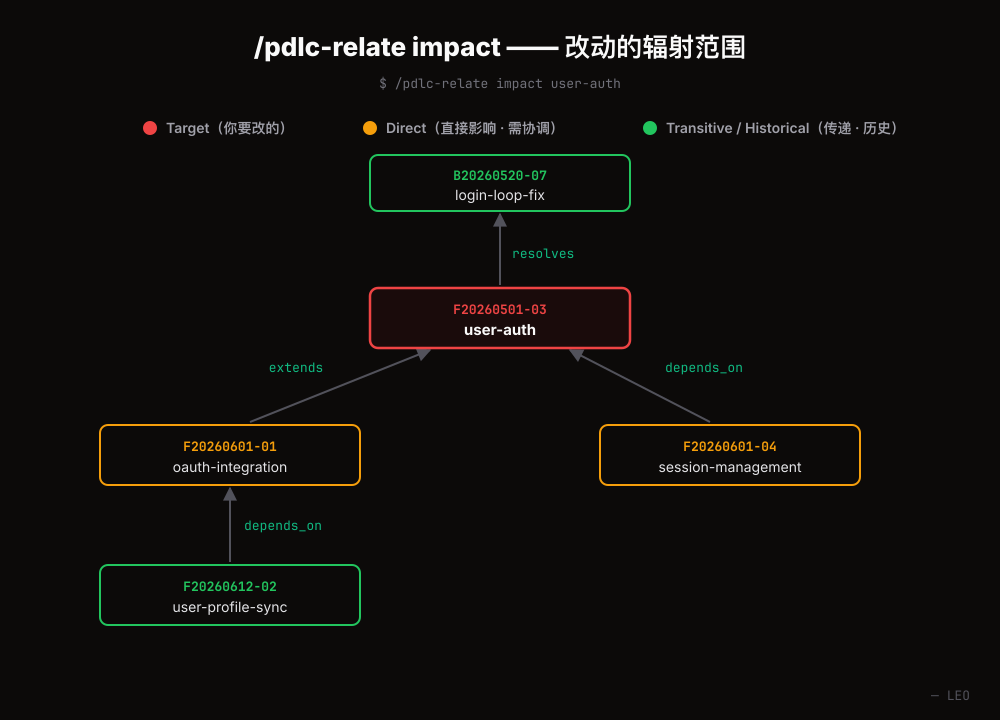
<p>The command that makes this useful is <code class="language-plaintext highlighter-rouge">impact</code>:</p>

<div class="language-bash highlighter-rouge"><div class="highlight"><pre class="highlight"><code>/pdlc-relate impact F20260501-03
</code></pre></div></div>

<p>Output:</p>

<div class="language-plaintext highlighter-rouge"><div class="highlight"><pre class="highlight"><code>Impact radius for F20260501-03 (user-auth)

🔴 Direct (depth 1) — must coordinate
   F20260601-01  oauth-integration   extends
   F20260601-04  session-management  depends_on

🟡 Transitive (depth ≥2) — should review
   F20260612-02  user-profile-sync   depends_on → F20260601-01

🟢 Historical — audit only
   B20260520-07  login-loop-fix      resolves
</code></pre></div></div>

<p>This is the answer to “what breaks if I touch this?” — with severity levels, not just a flat list. The direct layer tells you what needs coordination before you make the change. The transitive layer tells you what to review. The historical layer shows what defects this feature has already resolved, which is useful when deciding whether to edit in place or create a <code class="language-plaintext highlighter-rouge">supersedes</code> feature instead.</p>

<p><img src="/assets/images/posts/pdlc-relation-impact-diagram.png" alt="PDLC feature relation graph showing impact radius for user-auth feature" /></p>

<h2 id="what-to-watch-out-for">What to watch out for</h2>

<p>The ledger/surface distinction is easy to misapply in one direction: marking something surface when it should be a ledger. A design decision that gets reconsidered six months later should have both the original record and the new one — not an in-place overwrite that destroys the history of the decision. If you’re not sure, default to ledger. Surface is the right call only when the artifact is genuinely describing current state, not recording a decision.</p>

<p>For <code class="language-plaintext highlighter-rouge">/pdlc-relate</code>, the main friction point is bootstrapping. If you have thirty features and add the relation chain in v1.1, none of them have relation data yet. <code class="language-plaintext highlighter-rouge">/pdlc-relate orphans</code> will list all thirty as orphans, which is technically correct but not actionable. The practical approach is to add relations incrementally as you touch features, rather than trying to backfill the entire graph in one session.</p>

<p>The five-location redundancy is also worth noting as a tradeoff. Keeping relations in five places makes reads fast for any skill, but it means <code class="language-plaintext highlighter-rouge">/pdlc-relate validate</code> needs to run after any manual edit to catch drift. The alternative — a single source of truth that every skill reads — would require every relation lookup to go through <code class="language-plaintext highlighter-rouge">_relations.json</code>, which adds a dependency that wasn’t there before. The current design accepts the redundancy to keep skills loosely coupled.</p>

<h2 id="where-things-stand">Where things stand</h2>

<p>PDLC is at v1.1.0. The plugin has 33 skills (up from 31). The two new skills are additive — existing projects don’t need to migrate anything to get the v1.1 behavior for <code class="language-plaintext highlighter-rouge">/pdlc-arch</code>. The relation chain is opt-in; if you never run <code class="language-plaintext highlighter-rouge">/pdlc-relate</code>, nothing changes.</p>

<p>Both new skills dogfood their own concepts: the <code class="language-plaintext highlighter-rouge">docs/ARCHITECTURE.md</code> in the pdlc-skills repo is a surface artifact maintained by <code class="language-plaintext highlighter-rouge">/pdlc-arch</code>, and <code class="language-plaintext highlighter-rouge">docs/GLOSSARY.md</code> is managed as a surface file.</p>

<p>The piece that’s still manual: there’s no automatic detection of “you’re about to change a feature that has incoming <code class="language-plaintext highlighter-rouge">depends_on</code> edges.” The impact check has to be run explicitly. Whether to put this in the <code class="language-plaintext highlighter-rouge">/pdlc-implement</code> guard is an open question — it would add a lookup on every implementation start, which might be more noise than signal for small projects.</p>

<h2 id="install">Install</h2>

<div class="language-bash highlighter-rouge"><div class="highlight"><pre class="highlight"><code><span class="c"># New install</span>
/claude <span class="nb">install </span>kanfu-panda/pdlc-skills

<span class="c"># Upgrade from v1.0</span>
bash &lt;<span class="o">(</span>curl <span class="nt">-fsSL</span> https://raw.githubusercontent.com/kanfu-panda/pdlc-skills/main/install.sh<span class="o">)</span> <span class="nt">--upgrade</span>
</code></pre></div></div>

<p>Source and issues: <a href="https://github.com/kanfu-panda/pdlc-skills">github.com/kanfu-panda/pdlc-skills</a></p>

<p>First article in the series: <a href="https://dev.to/kanfu-panda/why-hard-contracts-beat-soft-conventions-when-working-with-ai-coding-agents-5fk7">Why Hard Contracts Beat Soft Conventions When Working With AI Coding Agents</a></p>

<h2 id="next">Next</h2>

<p>PDLC splits the workflow into many stages and leaves an artifact at each one. The upside is you don’t skip steps or drift off course; the cost is that it burns more tokens than just letting the AI write. Someone said to me today: “More docs means more tokens, right?”</p>

<p>That’s worth its own article: how this token bill actually adds up (I haven’t measured it precisely, but some of it is counterintuitive), and how I keep the cost down while still running this heavier process. Saving tokens is, in the end, saving money — but it’s not only about money.</p>]]></content><author><name></name></author><category term="blog" /><category term="PDLC" /><category term="Claude Code" /><category term="AI engineering" /><category term="workflow" /><category term="open source" /><summary type="html"><![CDATA[v1.0 solved the vertical problem: keeping a feature's stages in order. v1.1 fixes two horizontal problems — artifact shape confusion and a flat feature namespace with no memory of how features relate.]]></summary><media:thumbnail xmlns:media="http://search.yahoo.com/mrss/" url="https://kanfu-panda.github.io/assets/images/posts/pdlc-v1-1-cover.png" /><media:content medium="image" url="https://kanfu-panda.github.io/assets/images/posts/pdlc-v1-1-cover.png" xmlns:media="http://search.yahoo.com/mrss/" /></entry><entry xml:lang="zh"><title type="html">PDLC 1.1：v1.0 在产物形状上犯的两个错误</title><link href="https://kanfu-panda.github.io/blog/2026/06/08/pdlc-v1-1.zh.html" rel="alternate" type="text/html" title="PDLC 1.1：v1.0 在产物形状上犯的两个错误" /><published>2026-06-08T00:00:00+00:00</published><updated>2026-06-08T00:00:00+00:00</updated><id>https://kanfu-panda.github.io/blog/2026/06/08/pdlc-v1-1.zh</id><content type="html" xml:base="https://kanfu-panda.github.io/blog/2026/06/08/pdlc-v1-1.zh.html"><![CDATA[<p>用 PDLC 工作了几个月之后，我在一个项目的 <code class="language-plaintext highlighter-rouge">docs/</code> 目录里看到了这些文件：</p>

<div class="language-plaintext highlighter-rouge"><div class="highlight"><pre class="highlight"><code>docs/
├── architecture-2025-10-03.md
├── architecture-2025-11-14.md
├── architecture-2025-12-01.md
├── architecture-2026-01-08.md
└── architecture-2026-02-19.md
</code></pre></div></div>

<p>五份架构文档，每份都带日期。我不知道哪份是现在的架构。</p>

<p>这不是用户操作失误，是 PDLC v1.0 的设计失误。v1.0 把所有阶段产物都当成 append-only 的历史记录来处理。这个逻辑用在 PRD 上是对的，用在架构总览上就产生了这堆垃圾。</p>

<p>v1.1 修了两个这样的设计错误。</p>

<h2 id="错误一没有区分两种完全不同的产物">错误一：没有区分两种完全不同的产物</h2>

<p>做这件事之前，我先想清楚了一个分类：<strong>产物在时间维度上是什么形状？</strong></p>

<p>有一类产物，记录的是”发生了什么”。PRD、设计决策、会议纪要——每份都是历史证据，不能篡改，只能追加。你不会去改一份三个月前的 PRD 让它变成”最新的”，那会毁掉决策链。这类产物叫 <strong>ledger 型</strong>（账本）。</p>

<p>另一类产物，记录的是”现在是什么状态”。架构总览、团队编码规范、API 契约——永远只有一份”现在有效的版本”。你维护它的方式是就地更新，而不是另存一份带日期的副本。这类产物叫 <strong>surface 型</strong>（当前状态面）。</p>

<p>v1.0 没有这个区分，AI 默认给所有产物追加日期戳。于是 <code class="language-plaintext highlighter-rouge">/pdlc-arch</code> 每次运行都生成 <code class="language-plaintext highlighter-rouge">architecture-YYYY-MM-DD.md</code>，三个月后变成上面那五份文件的局面。</p>

<p>更糟的是规范文档。团队有一份 <code class="language-plaintext highlighter-rouge">coding-style.md</code>，被改了一次之后变成了 <code class="language-plaintext highlighter-rouge">coding-style-v2.md</code>。然后是 <code class="language-plaintext highlighter-rouge">coding-style-v3.md</code>。没人知道该 follow 哪份，干脆都不看。</p>

<p>v1.1 的修法很直接：让 AI 在生成产物之前先判断类型。ledger 型继续 append-only，加日期戳、不能就地改；surface 型则强制就地维护一个固定路径的文件——<code class="language-plaintext highlighter-rouge">/pdlc-arch</code> 只维护 <code class="language-plaintext highlighter-rouge">docs/ARCHITECTURE.md</code> 这一份，每次更新就地改，遗留的带日期文件自动归档到 <code class="language-plaintext highlighter-rouge">docs/archive/</code>。</p>

<h2 id="新指令pdlc-standard">新指令：<code class="language-plaintext highlighter-rouge">/pdlc-standard</code></h2>

<p>规范文档是 surface 型产物里最典型的一类，所以 v1.1 为它单独加了一个指令。</p>

<p><code class="language-plaintext highlighter-rouge">/pdlc-standard</code> 管理 <code class="language-plaintext highlighter-rouge">docs/00_standards/</code> 目录下的规范文档。它做几件事：</p>

<p><strong>add</strong>：新建一份规范，命名强制用语义路径（<code class="language-plaintext highlighter-rouge">coding/style</code>、<code class="language-plaintext highlighter-rouge">api/versioning</code>），禁止带版本号或日期。
<strong>edit</strong>：就地修改现有规范，自动记录修改时间，但文件名不变。
<strong>archive</strong>：如果一份规范彻底废弃，可以归档，但已有引用不会断。
<strong>index</strong>：输出当前所有有效规范的索引，用于 onboarding 或 review。</p>

<p>最关键的一条约束在提示词里是硬写的：<strong>如果 AI 在生成 <code class="language-plaintext highlighter-rouge">coding-style-v2.md</code> 这样带版本号的规范文件，必须中止并提示用户用 <code class="language-plaintext highlighter-rouge">edit</code> 子命令替代。</strong></p>

<p>这条约束从根上杜绝了版本号蔓延。</p>

<h2 id="错误二feature-之间互不相识">错误二：feature 之间互不相识</h2>

<p>v1.0 的状态机管理每个 feature 是一个独立的闭环：PRD → 设计 → TDD → 实现 → 评审 → 发布。这个纵向的流程设计是对的。</p>

<p>但现实里 feature 从来不是孤立的。</p>

<p>我在 aitm 项目里遇到了典型场景：<code class="language-plaintext highlighter-rouge">feature/安全层</code> 被 <code class="language-plaintext highlighter-rouge">feature/工具调用</code> 依赖。改安全层的黑名单规则，实际上会影响工具调用的确认逻辑。但 PDLC 的状态机只看单个 feature 的进度，没有任何地方告诉我这两个 feature 之间有关系。</p>

<p>结果是每次改安全层，我都要靠记忆去想”这会不会影响工具调用那边”——这是把本该系统记住的事情放进了人脑，不合理。</p>

<h2 id="新指令pdlc-relate">新指令：<code class="language-plaintext highlighter-rouge">/pdlc-relate</code></h2>

<p>v1.1 加了 <code class="language-plaintext highlighter-rouge">/pdlc-relate</code>，专门管理 feature 之间的关系。</p>

<p>关系类型有六种：</p>

<table>
  <thead>
    <tr>
      <th>类型</th>
      <th>含义</th>
    </tr>
  </thead>
  <tbody>
    <tr>
      <td><code class="language-plaintext highlighter-rouge">extends</code></td>
      <td>这个 feature 是另一个的扩展</td>
    </tr>
    <tr>
      <td><code class="language-plaintext highlighter-rouge">depends_on</code></td>
      <td>这个 feature 依赖另一个的实现</td>
    </tr>
    <tr>
      <td><code class="language-plaintext highlighter-rouge">supersedes</code></td>
      <td>这个 feature 替代了另一个（另一个应该归档）</td>
    </tr>
    <tr>
      <td><code class="language-plaintext highlighter-rouge">resolves</code></td>
      <td>这个 feature 修了另一个 feature 引入的问题</td>
    </tr>
    <tr>
      <td><code class="language-plaintext highlighter-rouge">conflicts_with</code></td>
      <td>两个 feature 有已知冲突，不能同时激活</td>
    </tr>
    <tr>
      <td><code class="language-plaintext highlighter-rouge">relates_to</code></td>
      <td>宽泛的关联，不属于以上类型</td>
    </tr>
  </tbody>
</table>

<p>建立关系很简单：</p>

<div class="language-bash highlighter-rouge"><div class="highlight"><pre class="highlight"><code>/pdlc-relate <span class="nb">set </span>feature/工具调用 depends_on feature/安全层
</code></pre></div></div>

<p>但杀手锏是另一个子命令：</p>

<div class="language-bash highlighter-rouge"><div class="highlight"><pre class="highlight"><code>/pdlc-relate impact feature/安全层
</code></pre></div></div>

<p>这个命令输出：直接依赖这个 feature 的有哪些、通过传递关系间接影响的有哪些、历史上被它替代或解决的有哪些。一个命令，把改动的辐射范围摊开来看。</p>

<p><img src="/assets/images/posts/pdlc-relation-impact-diagram.png" alt="PDLC feature 关系图：改 user-auth 时的 impact 辐射范围（红=要改的，黄=直接影响，绿=传递/历史）" /></p>

<p>做这个功能的时候有个反直觉的选择：关系数据存在 <code class="language-plaintext highlighter-rouge">docs/.pdlc/</code> 下面的结构化文件里，而不是某种专有数据库格式。理由是，这些关系是”团队的知识”，应该随代码一起提交、review、合并。如果存在黑盒里，换机器或换人就丢了。</p>

<h2 id="两个功能一起踩的坑">两个功能一起踩的坑</h2>

<p>surface 型产物的迁移，比我预想的麻烦。已有项目里那些旧的带日期架构文件，PDLC 怎么知道哪份是”最新的”？答案是不猜——<code class="language-plaintext highlighter-rouge">/pdlc-arch</code> 检测到遗留文件时会停下来问你：”我看到 <code class="language-plaintext highlighter-rouge">architecture-2026-02-19.md</code>，要用这份作为 <code class="language-plaintext highlighter-rouge">ARCHITECTURE.md</code> 的初始内容吗？”一个确认步骤，避免自动迁移出错。</p>

<p>关系类型的设计，我也走了点弯路。第一版草稿里只有三种关系：依赖、扩展、冲突。拿真实项目试跑了一遍，发现有不少 feature 之间的联系根本描述不了——比如”这个 feature 修了那个 feature 的遗留问题”，归不进三类里的任何一个。最后扩展到六种，六种是够用的边界，再多就变成分类游戏了。</p>

<h2 id="当前状态">当前状态</h2>

<p>v1.1 已经用在了三个项目上：aitm、pdlc-skills 自身、一个朋友的 SaaS 项目。</p>

<p>ledger/surface 分离解决了最让人抓狂的问题——<code class="language-plaintext highlighter-rouge">docs/</code> 不再是时间轴，是可以查找信息的地方。<code class="language-plaintext highlighter-rouge">/pdlc-relate impact</code> 在做跨 feature 的改动时每次都在用，省了不少”这会不会影响那边”的回溯排查。</p>

<p>33 个标准化阶段的核心结构没有变，v1.1 只在产物形状和关系建模上做了修正。如果你已经在用 v1.0，升级基本上是无感的——除了 <code class="language-plaintext highlighter-rouge">/pdlc-arch</code> 下次运行时会问你迁移旧文件。</p>

<h2 id="安装--升级">安装 / 升级</h2>

<p><strong>首次安装</strong>（需要 Claude Code）：</p>

<div class="language-bash highlighter-rouge"><div class="highlight"><pre class="highlight"><code>/claude <span class="nb">install </span>kanfu-panda/pdlc-skills
</code></pre></div></div>

<p><strong>升级已有安装</strong>：</p>

<div class="language-bash highlighter-rouge"><div class="highlight"><pre class="highlight"><code>bash &lt;<span class="o">(</span>curl <span class="nt">-fsSL</span> https://raw.githubusercontent.com/kanfu-panda/pdlc-skills/main/install.sh<span class="o">)</span> <span class="nt">--upgrade</span>
</code></pre></div></div>

<p>源码在 <a href="https://github.com/kanfu-panda/pdlc-skills">GitHub</a>，MIT 开源。用了遇到问题，Issues 开着，我在看。</p>

<h2 id="下一篇">下一篇</h2>

<p>PDLC 把流程拆细、步步留产物——好处是不跳步、不跑偏，代价是它比”直接让 AI 写”更吃 token。今天就有人跟我说：”文档一多，token 不就烧得更凶？”</p>

<p>这事值得单独聊一篇：这笔 token 账到底该怎么算（我没精确测过，但有些反直觉的地方），以及在用这套重流程的同时，我是怎么把花销压下去的。省 token 说到底就是省钱，但也不只是省钱。</p>]]></content><author><name></name></author><category term="blog" /><category term="PDLC" /><category term="Claude Code" /><category term="AI工程" /><category term="工作流" /><category term="开源" /><summary type="html"><![CDATA[v1.0 解决了纵向问题：让单个 feature 的各阶段有序推进。v1.1 修了两个横向问题——产物类型混淆（ledger vs surface）和 feature 间关系缺失。]]></summary><media:thumbnail xmlns:media="http://search.yahoo.com/mrss/" url="https://kanfu-panda.github.io/assets/images/posts/pdlc-v1-1-cover.png" /><media:content medium="image" url="https://kanfu-panda.github.io/assets/images/posts/pdlc-v1-1-cover.png" xmlns:media="http://search.yahoo.com/mrss/" /></entry></feed>