How to make your AI actually get you: give it a memory
Table of Contents
I keep tripping over the same AI in the same spot.
Take Ant Design 6 in a front-end project. I’ve told it, over and over, to use the new syntax—I even make it run context7 to check the API before it writes a line. It nods along, then goes right ahead and writes a pile of long-deprecated old syntax. Same with my release process: I’ve laid out the rules clearly, and a while later it forgets, doing things its own made-up way.
Once or twice is a slip. After enough times, I wanted to understand why: it’s not dumb, it simply has no memory.
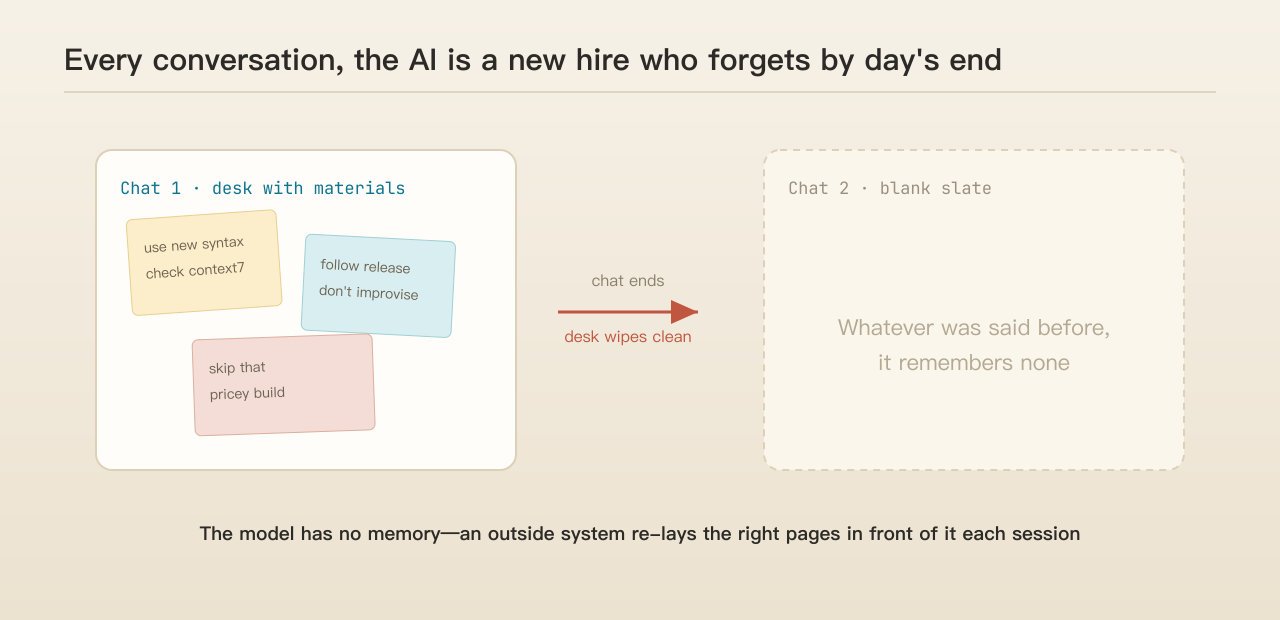 (This picture helps: every new conversation, the AI is like a new hire who clocks in fresh and forgets everything when they clock out.)
What I want isn’t a stronger model
At first I was puzzled too: a model this capable, and it can’t even hold on to “what we said last time”? To figure it out, I started watching it—how it actually runs when it answers and works, where it drops the ball.
Watching long enough, one thing clicked, and it’s what this piece is about: what I want isn’t to swap in a stronger model, but to make the AI I already have understand me better and better within my projects. The lever is “memory.”
Let me put the ceiling up front, so this doesn’t sound like snake oil. Memory doesn’t raise the model’s IQ. It raises exactly one thing—how well this AI works for you specifically. And as you’ll see, even once it remembers, it may not obey. Ceiling set. Let’s go.
Starting from the human brain: where AI memory needs work
I want to explain this through the human brain, because AI memory is, at bottom, a clumsy imitation of how people remember and forget. Understand that, and you’ll see which directions AI needs to shore up.
One: the AI is a “new hire” every single day
First, accept a counterintuitive fact: the model itself has no memory. Every time you open a conversation, all it “knows” is the text you put in front of it this one time—everything else is blank. What you discussed last round, the rule you set yesterday, it remembers none of it.
Here’s a metaphor. Everything it can see this one time is like a desktop—you lay materials out, it can use them; the moment the conversation ends, the desktop wipes clean, nothing left.
| Like | What it is | |
|---|---|---|
| Context window | The desktop | What’s spread in front of it this time; wipes clean when the chat ends |
| Memory | Drawers, filing cabinet | Stored outside; pulled out and laid back on the desk when needed |
Someone will say: just make the desktop bigger, right? Isn’t everyone racing on “ultra-long context”? But a bigger desk is still a desk—it empties when the power’s off; it isn’t memory. Worse, pile it with irrelevant paper and the AI gets more easily distracted and answers worse. There’s a growing consensus these past couple of years: more context isn’t better—stuff in a heap of tangentially-related material and the model’s performance visibly drops.
So “giving AI a memory” was never about the model remembering on its own, nor about making the desktop infinitely large. It’s about having a system outside that, every time it clocks in, lays exactly the right few sheets back in front of it.
Claude Code actually ships with such a system: one memory per small file, plus an index file as the table of contents, pulling in only the entries you need. Honestly, this arrangement isn’t my design—it’s built into the software. I didn’t pay it much attention at first; I just treated it as a place to stash notes. My guess is it’s designed this way precisely to save the desktop: no need to dump everything on the table every time, take it as needed.
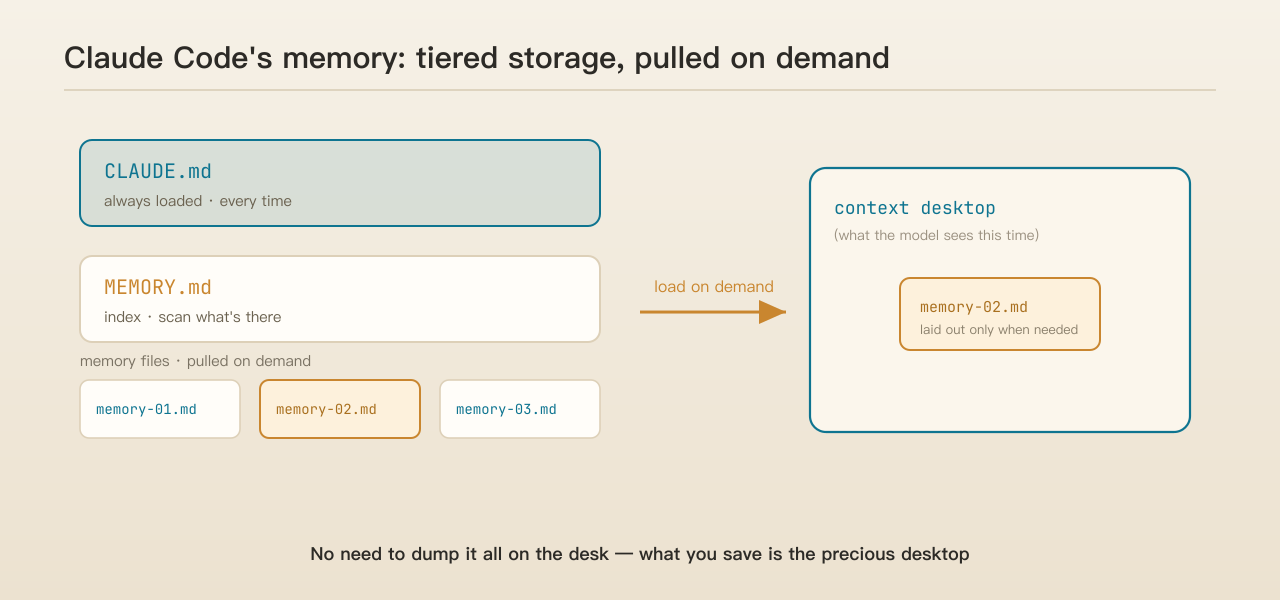 (This picture helps: an always-loaded CLAUDE.md + an index + on-demand memory files—what you save is the precious “desktop.”)
You may already want to say: isn’t this just a built-in Claude Code feature, what’s there to write about? The structure is its, true. But after using it—and falling on my face a few times—I found this: the software builds out “where things are stored and how they’re pulled,” but “what to store, when to clean, and what to do when it’s remembered but ignored”—the three that actually matter—it does none of for you. That’s what this piece is about.
Two: good memory is structure, not a pile of paper
To make memory useful, first understand this: good memory has structure; it isn’t piling more and more in.
Psychology has a very convincing experiment. Show a chess master a real game position and they can put it back almost exactly after a couple of glances. But scatter the pieces randomly, against any chess logic, and the master’s recall drops right back to a beginner’s level.
This shows the master doesn’t have “more capacity.” They can remember a real position because there’s structure in their head—they compress twenty pieces into a few meaningful “shapes.” Kill the structure and the edge vanishes instantly. The strength of memory isn’t in how much you store, but in how good the structure is.
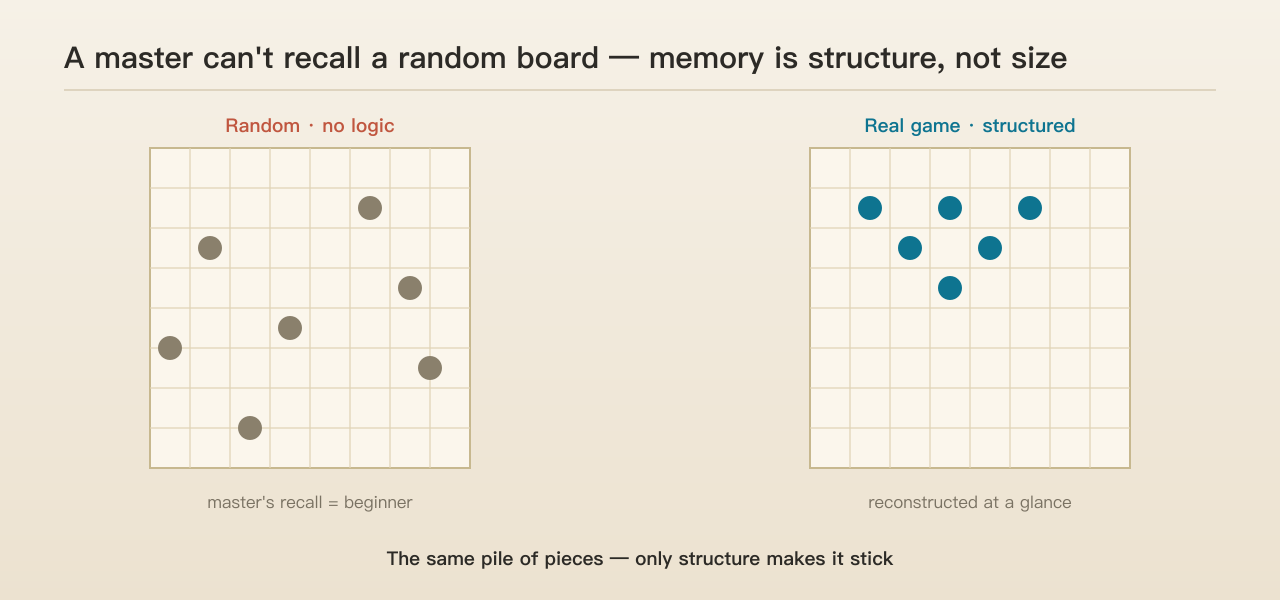 (This picture helps: the same pile of pieces—only with structure do you remember it. Memory is about structure, not capacity.)
Why does structure make you remember more accurately and deeply? Because structure is essentially “connection.” The more a piece of knowledge connects to other things, the more paths there are to recall it—block one, another still leads there. And with structure you can “follow the vine”: forget a detail and you can reconstruct it from the surrounding frame. That’s why the more interconnected things are, the more firmly and reliably you remember them. Humans are far better at remembering places and directions than loose text, which is why the ancient “memory palace” trick exists—placing the things to remember, one by one, into an imagined space. Memory is a space, not a list.
Look back at Claude Code’s setup—categorized, entries cross-referencing each other, an index laid on top—and it’s exactly building structure into memory, keeping it from becoming a heap of loose paper. This layer, the software does well.
Three: you have to decide what’s worth remembering
The software builds the shelves; what goes on them is your call. That job landed on me, and it comes down to three kinds: unified conventions get recorded; things that go wrong often get recorded; things strictly forbidden get recorded.
Conversely: whims, one-offs, things you can learn by reading the code—don’t record. Record too much and it’s all noise, drowning the few that actually matter—storing accurately beats storing a lot. Same as with people: someone who tries to remember everything usually holds onto nothing.
Four: fixing a mistake means overwriting, not appending
There’s one especially valuable kind of memory: the correction after a mistake. How you record this kind is where the craft is.
The human brain has a clever mechanism—every time you recall a memory, you’re actually rewriting it, not just reading it. In that moment of recall, the memory becomes editable. So the right way to fix a mistake is to pull out the wrong entry, correct it on the spot, and store it back—not leave the wrong one untouched and add a “note” beside it.
This isn’t nitpicking. Keep the wrong one and paste a correction next to it, and you’ve handed the AI a self-contradicting file—it reads both and won’t always pick the right one. It’s like an error notebook: you don’t leave the wrong solution there with a little check mark beside it; you put the correct method on top and make the wrong version disappear.
That’s exactly what I do. The AI once had a security false alarm, treating a nonexistent attack as real and sounding off about it. I didn’t keep that wrong judgment and paste a “actually it was a false alarm” beside it—I recorded it as an error, spelled out where it went wrong and what to do next time, aiming to not repeat it. One error notebook beats a stack of “correct answers.”
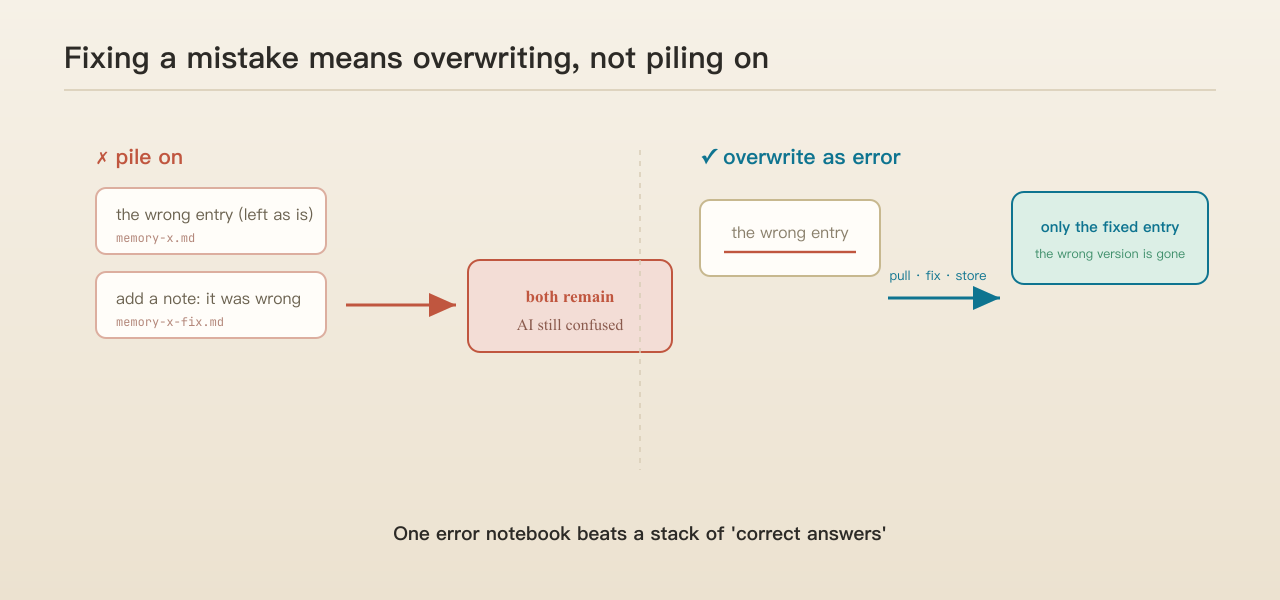 (This picture helps: pull the wrong one out, fix it, store it back—only the corrected entry is left; instead of keeping the wrong one and adding another.)
The hardest fall I took: does remembering guarantee it obeys?
No. This is what I most want to warn you about, and the least feel-good line: writing a rule down doesn’t mean the AI will follow it.
That Ant Design 6 is the living example. I wrote the new syntax into the rules, hung context7 on it to check on the spot—and it still hands you a pile of deprecated syntax. The release process is recorded and still gets bypassed by its own imaginings. Another time, I explicitly forbade it from using that very expensive build system, and only after several reminders did it finally remember.
Why remembered-but-ignored? Two possibilities, I think. One, the rules were simply ignored—sitting right there, but it didn’t take them in. Two, my own tooling wasn’t good enough: the rule lay in the filing cabinet, but at the moment it actually acted, no one pulled the right entry out and laid it in front of it—so it genuinely “didn’t know.” That’s a tooling gap, not something to pin entirely on the model.
How did I finally pin it down? Not by writing the rule harder, in a bigger font—by switching tactics: hard gates. Quality checkpoints, external check scripts, and if it doesn’t pass, it simply doesn’t get through. That’s what actually held.
The logic is the same as with people: for things that truly matter, people never rely on “remembering” alone—they stick a note on the monitor, set an alarm, run a checklist, turning it into something you can’t route around. Memory’s job is to let the AI know; the gate’s job is to make it unable to do otherwise. And the gate has an edge memory can’t match: it doesn’t depend on timing—whether or not the AI recalls it this round, the gate is always standing there.
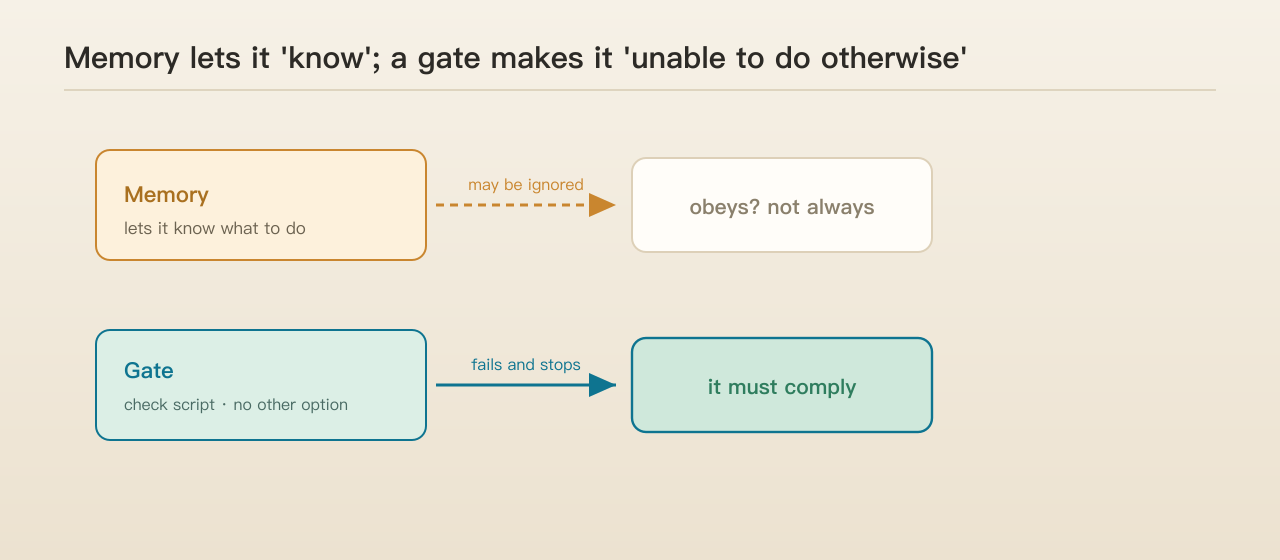 (This picture helps: memory can be ignored; a gate stops you cold if you don’t pass.)
On maintenance, by the way: I don’t clean these memories daily, but I keep an eye out—when some feel garbled or muddled, I have the AI tidy them up. That’s for later, and it’s the hook for the next piece.
So, does it really get me better now?
Was the whole ordeal worth it? Let me give one moment that stuck with me.
A few times, some constraint even I had forgotten—days later, the AI remembered it, and looked out for me on its own. That felt different: it was no longer just a tool I had to brief from scratch every time, but more like an old partner with a better memory than mine.
That’s the before and after. Before, it was “it often doesn’t do what I mean,” and I had to watch and correct constantly. Now, plenty of rules I’ve let go of, it covers for me. Of course it’s not foolproof—those “remembered-but-ignored” pits are still there, and I’m not glossing over them. But the direction is right: the smoother the structure I feed it, the more errors it banks, the harder the gates at the key spots, the better it works for me here. That didn’t come from swapping in a smarter model; it’s the same model, fed bit by bit by this memory of mine.
Three reusable takeaways
One, don’t rush to a stronger model. Nine-tenths of daily work isn’t a contest of model IQ; it’s how well it works for you. Get the memory right—conventions, error notebook, boundaries—and even an ordinary model can be trained into something that really gets you. Used well, a memory system makes AI both smarter and more attuned to you. That’s not mystical; it’s what I’ve worn in day by day.
Two, “what to remember” and “what to do when it remembers wrong” are jobs the software can’t do—only you can. Unified conventions, frequent errors, hard bans—those three are worth recording; and when it’s wrong, overwrite it as an error, don’t pile on. Accurate beats a lot.
Three, the more critical the constraint, the less it should rely on memory alone—turn it into a gate. Memory is a reminder, and reminders get ignored; a gate is a sluice you can’t route around. At the key spots, a “fails and stops” check beats ten “please do remember”s.
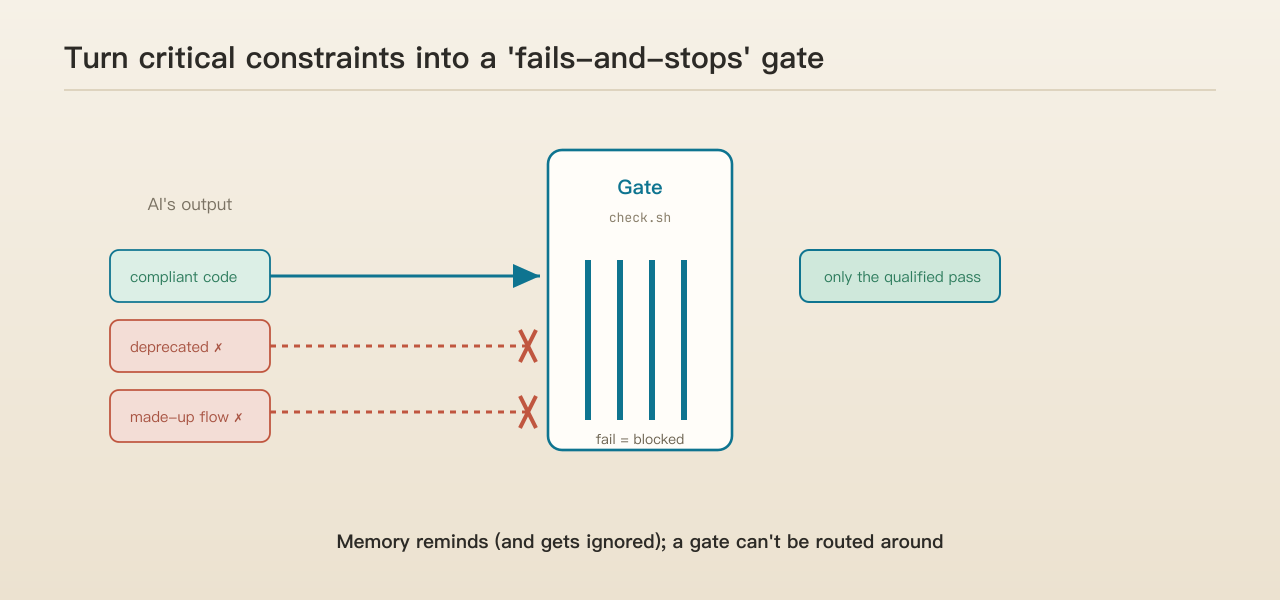 (This picture helps: memory reminds, the gate blocks—for what matters, lean on the latter.)
Next up: letting memory renew itself
This piece is about which lessons AI memory needs to learn: it needs structure, it needs to be selective, fixes need to overwrite, and the critical ones need gates. But you may already see a question: as you keep recording, the entries multiply, get tangled, go stale—who cleans them up? I still do it by hand—when it feels messy, I tell the AI to tidy up. Could this be something it does on its own, periodically, like a person waking from sleep re-filing the day’s memories—forgetting what should be forgotten, consolidating what should stick? That’s the next piece: the evolution loop of memory—teaching it to renew itself.
If this gave you a fresh thought about the AI in your hands, a like and a follow would mean a lot—so you don’t miss the next one.
Comments