How Do the Three Engineering Paradigms Interlock in pdlc-skills?
Table of Contents
Last post ended with a yardstick: to tell whether a tool’s three layers are genuinely joined, check whether they share one piece of state. This post cashes that in — the three layers never call each other, not once. They hand off through a single file on disk. There’s also a side effect I didn’t see coming: because that file is split per feature, the pipeline doesn’t only run one line downward, it fans out sideways and runs several at the same time.
Last post placed each layer inside pdlc-skills: the rules every command shares are the prompt layer, the stretch that advances on its own is the loop layer, the stage order and the relation graph are the graph layer.
But knowing who governs what is not the same as knowing how they fit together.
Following that thought, the most direct move is to go into the code and find the call — where Graph calls Loop, where Loop calls the prompt layer. You won’t find it. There is not one line of code in which these three layers reference each other.
So how do they end up working together?
The key is timing, not calling
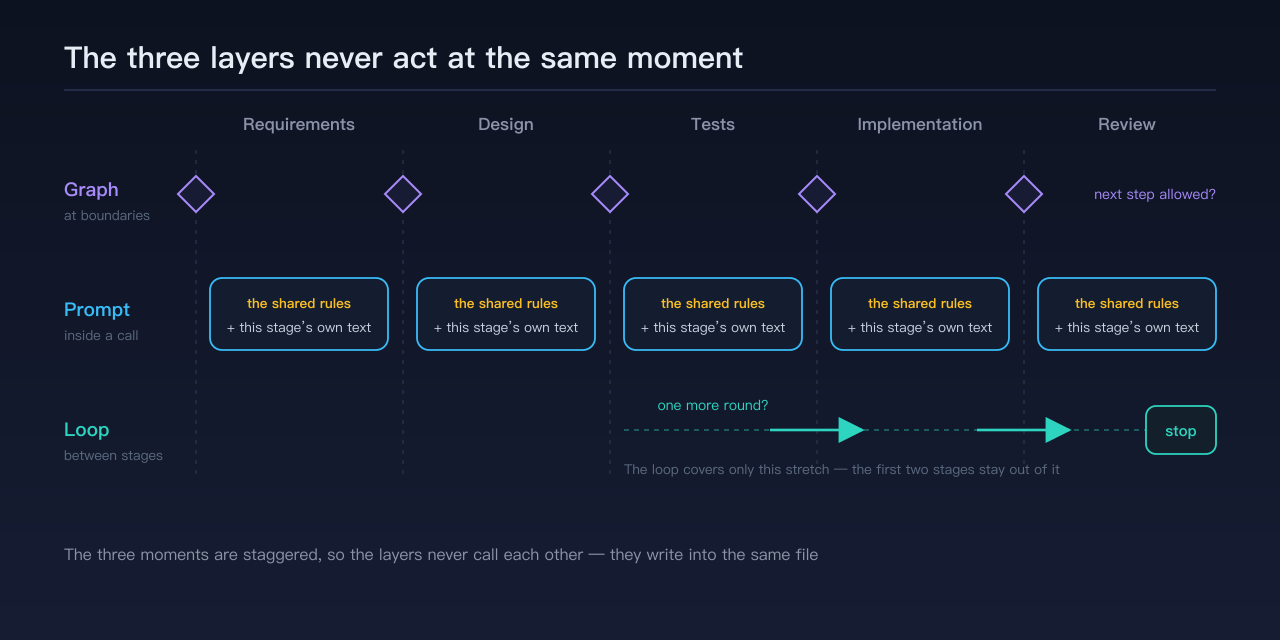
The three layers don’t need to know each other, because they don’t act at the same moment.
| Layer | When it acts | What it governs |
|---|---|---|
| Graph | at stage boundaries | whether you may enter the next step |
| Prompt | inside one invocation | what the model sees this time |
| Loop | between stages | whether another round is needed |
An analogy: Graph checks tickets at the door, the prompt layer does the talking inside the hall, Loop stands outside counting how many sets are left. The three never speak to each other. They go by the same scoreboard.
That scoreboard is the file on disk.
Following one feature all the way through
Enough abstraction. Here’s a real feature from start to convergence, one beat at a time.
Beat one: the opening move. A new feature has just been declared and there is nothing on disk yet. Exactly one command can pick it up — write the requirements. Why? Because every other command declares which prior document it needs: design needs requirements, tests need design, and not one of those preconditions is satisfied. This isn’t advice to “write requirements first,” it’s that without the prior artifact you cannot get through the door. That’s Graph doing its job, and its job is only “do I let you in.”
Beat two: doing the work. Once you’re through the door, Graph steps off and the floor belongs to the prompt layer. In this one invocation, the model sees more than the command’s own text — it also sees the full set of rules shared by every command: artifacts must land on disk, self-check before handing off, fix once and don’t recurse. Those rules live in one place and expand in at call time, rather than being copied into each command.
What comes out isn’t free-form prose either. The filename, the directory, the sections — all fixed; and the document carries a small identity header at the top saying which feature it belongs to, which stage it’s in, and which document came before it. I won’t unpack the format here; what matters is what it buys you: the artifact carries its own coordinates, so you can walk backwards from it all the way to the original requirement.
Beat three: closing out by writing to disk. This is the critical beat. Finishing the main work isn’t the end of it — the command has to record a line in that file: I’ve finished this stretch, here’s how it went, here’s who picks it up next. The file sits on disk, one per feature.
Beat four: the stop decision. Only now does the loop appear, and it reads nothing but that file — not the code, not the artifacts, not the chat log. It reads and emits one result: which command runs next, or “done,” or “blocked.” The outer script takes that result, runs the next command, and we’re back at beat three.
Once review is complete the loop stops, emits “done,” and waits for a human. Shipping and deploying are never inside the loop — once it’s out, you can’t pull it back, and what it touches is real users in production.
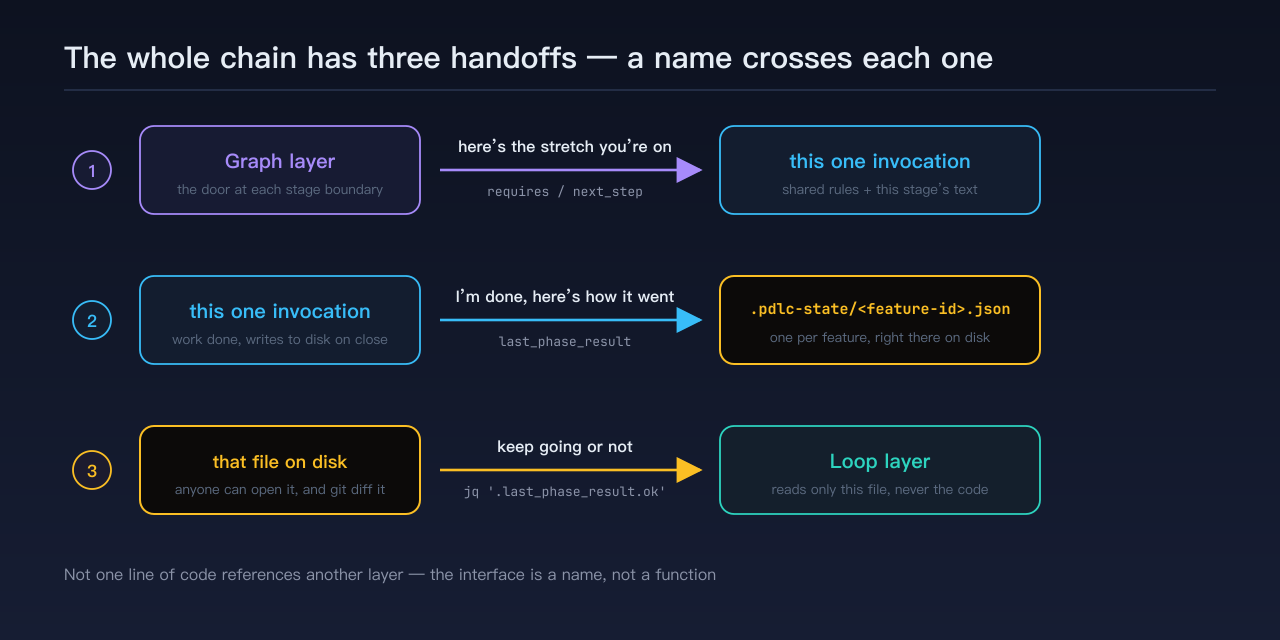
So the whole chain has exactly three handoffs, and what crosses each one is a name, not a call:
- what Graph hands the invocation: “here’s the stretch you’re on”;
- what the invocation hands the disk: “I’m done, here’s how it went”;
- what the disk hands the loop: “keep going or not.”
None of the three ever touches another.
The one design in that file that matters most
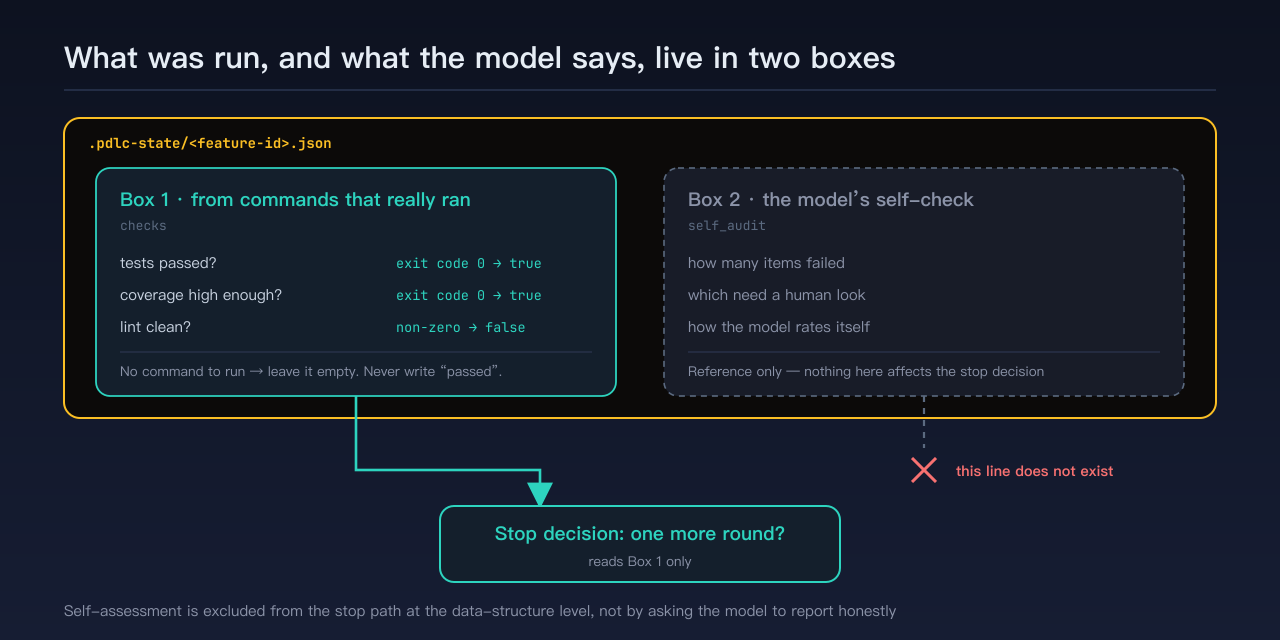
What was actually run and what the model says about itself go in two separate boxes.
The first box takes only results from commands that really ran: did tests pass, is coverage high enough, is lint clean — all booleans translated from exit codes. If a stage has no command to run at all (requirements and design produce documents only), the box stays empty; you may not fill in “passed” because “I feel this went well.”
The second box is the model’s own self-check, recording only how many items failed. Reference only. Never part of the stop decision.
Where’s the difference? The loop’s stop decision reads the first box and nothing else. Which means the model’s self-assessment is excluded from the stop path at the level of the data structure, not by a line asking it to please report honestly. Whatever it writes in the second box cannot change whether this round stops.
That’s what “the three layers share one piece of state,” from last post, actually comes down to.
The real loop has two levels
Time to admit something: the loop drawn above is only the inner loop.
When I actually put this to work, the shape looks like this —
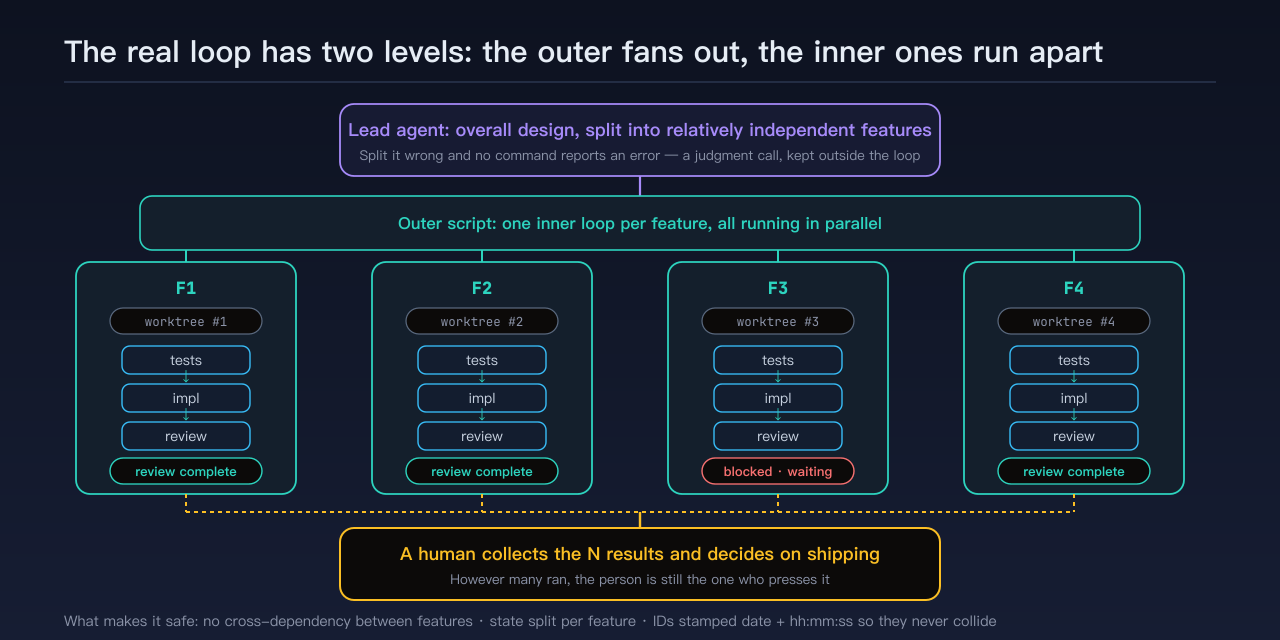
Lead agent: overall design → split into N mutually independent features
    ↓
Outer script: start one loop per feature
    ↓
Inner loop × N (each on its own feature)   ← running at the same time
    ↓
Each stops at "review complete" or "blocked" → a human collects the results and decides on shipping
A lead agent does the overall design and splits the work into a set of mutually independent features. The outer script starts an inner loop per feature. Those loops run forward in parallel, each stopping at its own endpoint. Finally a human gathers up the N results.
What makes it safe to run them at the same time? The precondition is that what you split out really is relatively independent features — no dependencies between them, or there’s no parallelism to speak of. Given that, the state files are split per feature too: one feature, one file, no cross-dependency.
Feature IDs use “date + hours-minutes-seconds” rather than the day’s sequence number. The reason spelled out in the repo: when several people or several AIs start work at the same time, each one grabbing “today’s highest number plus one” is guaranteed to collide, and colliding state files with the same name have to be renumbered by hand. Switch to the timestamp of the moment of creation and independent copies almost never collide. This ID format was built for parallelism from the start — I just didn’t think of it as a piece of design at the time, only as a small trick against collisions.
The code has to be isolated too: each feature’s inner loop runs in its own git worktree, out of everyone’s way, with artifacts going through separate PRs.
So why must the split stay with a human, or with the lead agent? Last post gave the test: hand the loop whatever can find its own errors, keep the rest with people. “How many features should this batch of requirements split into, and which depend on which” — get it wrong and no command reports an error. It’s a judgment call, not a check. So it lives outside the loop.
The two levels also end differently: the inner loop ends at review complete, the outer one ends when all N have converged. And shipping remains the single human gate — no matter how many ran at once, the person is still the one who presses it.
I’ve run this for real on a command-line tool project of my own. How to get it running, how the guardrails are set, what an overnight run actually produces — later posts cover that. This one only draws the shape.
Next up: getting it running in your own project
If this post leaves you with one line, I’d like it to be this: the three layers interlock not because they call each other, but because they write into different boxes of the same file.
The interface is a name, not a function — which is why changing one layer doesn’t ripple into another, and why this pipeline can be copied sideways several times over.
I deliberately didn’t drill down here: which fields that state file actually has, how the loop’s guardrails and limits are set, how parallel runs are closed out — all of that is for later posts. Get the shape clear first, then look at the parts.
That covers it: what the three layers are, where each one lands, and how they interlock — three posts. Next post turns in a different direction: in your own project, how to install it, how to start, and how to bring an existing codebase in — from this post’s blueprint to the first command that actually runs in your terminal.
Want to try it:
curl -fsSL https://raw.githubusercontent.com/kanfu-panda/pdlc-skills/main/install.sh \
  | bash -s -- --global
The repo: https://github.com/kanfu-panda/pdlc-skills
If it’s useful, a star goes a long way ⭐
That two-level diagram is how I actually run this; it lived only in my head until I drew it. If it gave you a concrete picture, a reaction helps. And if someone near you is working out how to get AI to do several things at once, pass it along.
Comments