Want AI to work in parallel? First give each one its own workspace
Table of Contents
A while back I wrote about parallelism—taking one big task, splitting it, and fanning it out to several agents at once. But I left a thread hanging: when several agents edit code at the same time, what keeps them from clobbering each other? That’s what this post is about.
Let me start with the wall I ran into myself. The subagents an AI spins up on its own within a session—those are actually fine; it works out isolation by itself, I don’t have to worry much. What burned me was the other kind: I manually opened several AI terminals and had them edit the same project at once. Several hands reaching into the same working directory, you write a bit, I write a bit, files overwriting each other, state in a mess—halfway through, nobody’s work is clean.
What I want, and one boundary
What I want isn’t complicated: several parallel hands, each doing its own thing, editing the same project without clobbering each other.
But let me draw a boundary up front—not every kind of parallelism needs isolation. If I send several agents out—one to dig through logs, one to analyze a cause, one to flip through docs—those are all read-only, and they can crowd into the same workspace with zero trouble; no need to carve out a plot for each. What actually needs isolation is the parallelism that writes to files. Reads can share, writes must split—that’s the starting point for everything below.
The detour: I cloned twice first
To get two AIs editing one project without interfering, the first thing I reached for was the dumbest move—physical isolation: clone the project into two separate directories, one AI per copy, each minding its own.
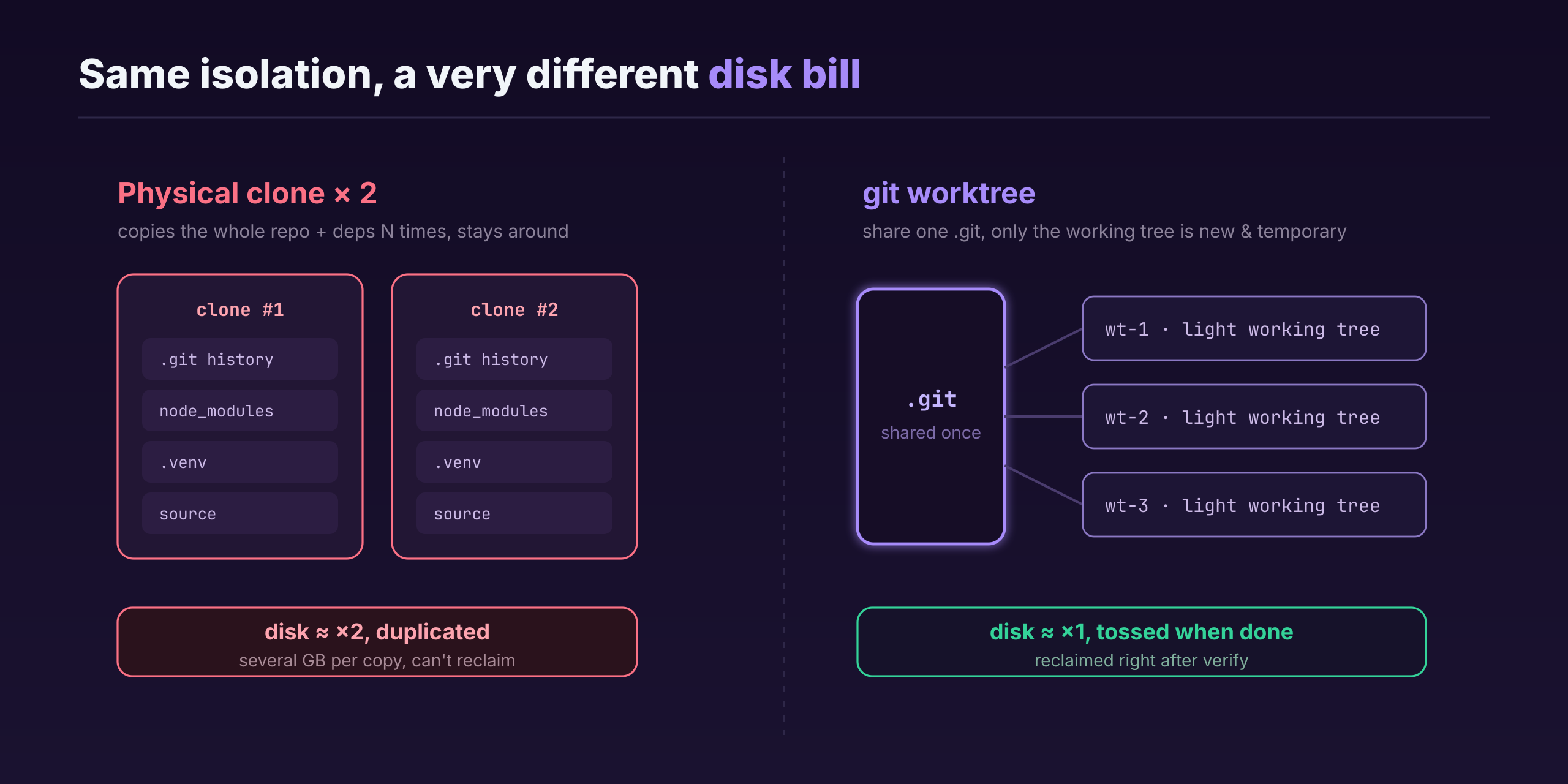
Clean, genuinely clean—but it rubbed me the wrong way fast: disk. A lot of my projects are React frontend + Python backend, with a pile of dependencies; a single clone runs several gigs. Clone twice and a big chunk of disk gets duplicated. Worse, as long as I want to keep working this “two copies” way, both copies have to sit there taking up space—no reclaiming them.
That’s when I switched to git worktree. Its upside lands right on that pain point: several working trees share a single .git, so you don’t copy the whole repo and its history over and over; and it’s temporary—once the work’s done and verified, you reclaim it right away, unlike a clone you have to keep around. The two approaches isolate about equally well, but worktree doesn’t waste disk.
Two kinds of parallelism—who opens the worktree
In practice you have to tell two scenarios apart; they open worktrees differently.
One is subagent parallelism within a session. This one’s the most hands-off: I just say “run in parallel” to the AI, and it splits the task on its own, opening a worktree itself when isolation’s needed—I don’t have to spell it out.
The other is me manually opening several terminals in parallel. The AI doesn’t know about this by default—it has no idea another AI is also touching this directory right now. So I have to tell it explicitly: “There’s already another AI editing this project directory; work in worktree mode.” Once I point that out, it creates a new worktree to work in, instead of going straight at the main working tree.
A workflow that runs smooth
Isolating is only step one; the work still has to come back. My flow goes roughly like this:
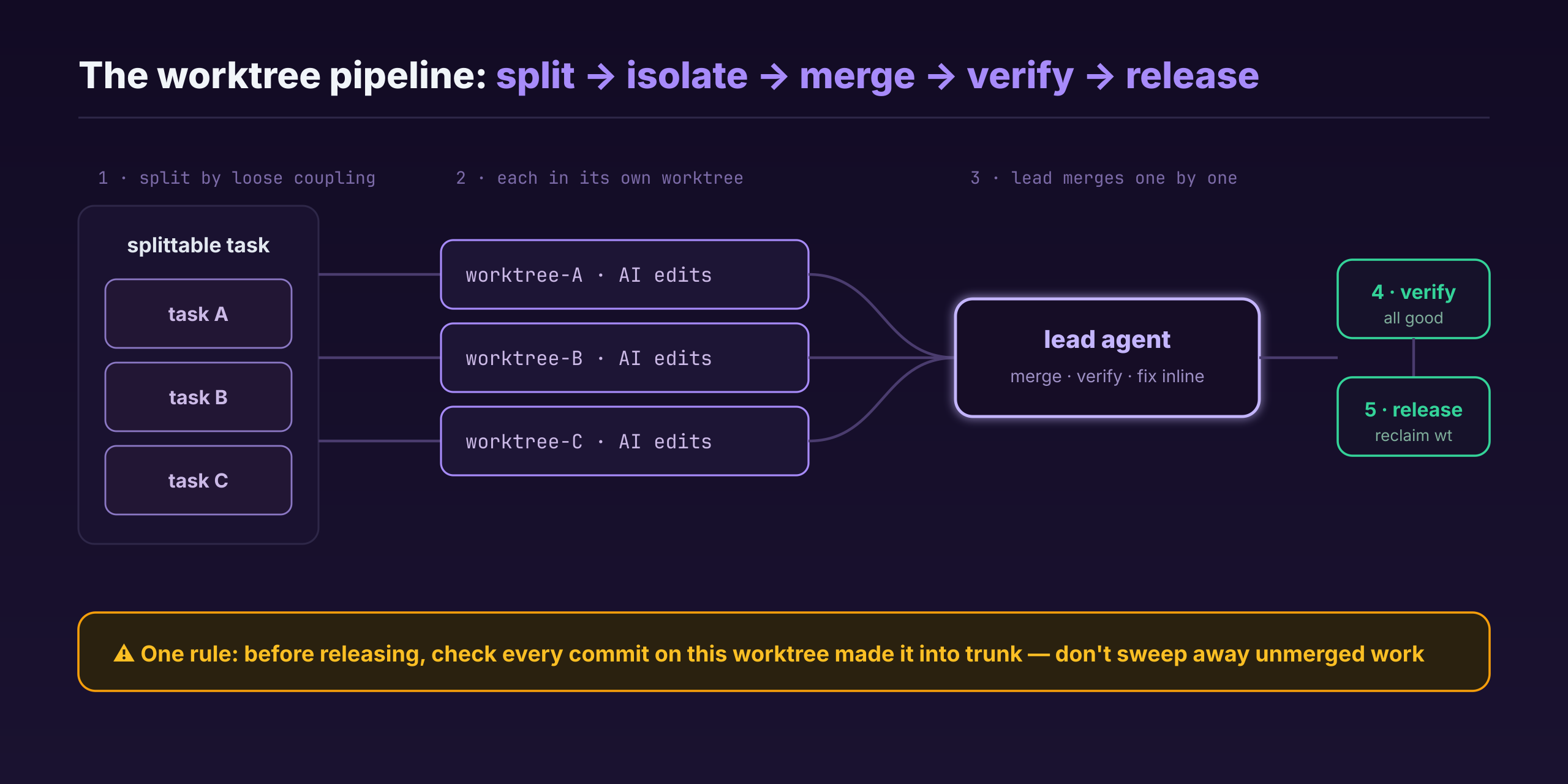
Split along task lines that can actually be split—same as last post, pick the loosely coupled parts and send each into its own worktree. When they’re all done, the lead agent merges them back into the branch one at a time, merging one and verifying one, fixing problems on the spot; once a piece checks out, it releases that worktree.
If two worktrees really did touch the same file, the lead agent steps in to merge. But honestly that’s rare—when you split tasks you keep each piece as independent as you can; if two pieces are coupled enough to conflict, they shouldn’t have been split into two tasks in the first place.
Pits I’ve hit and ones to guard against
The most common pit is forgetting to clean up. A worktree you forget to delete just sits there eating space. But it’s not fatal—the feature was long since merged into trunk, so nothing’s lost, no name collisions, no garbled git state; it just takes up room.
Still, “takes up room” needs handling. I wrote a line into my global rules: once the work in a worktree is verified and merged with no problems, clean it up. I added a safeguard too—before releasing, go back and check whether all the commits on that worktree have actually made it into trunk, so a hasty hand doesn’t sweep away an unmerged feature whole. A stronger AI handles this recognition and cleanup itself; a weaker one tends to miss it, and then I have to watch, or call the lead agent back to handle it.
So far I haven’t actually deleted a useful worktree by mistake—that “check the commits” step before every cleanup has basically held the line. But if a human cleans up by hand, that check is gone, and you can lose unmerged work; that one you have to watch yourself.
Don’t force it, but one line holds
Don’t treat worktree as a cure-all either. A simple task, a few files changed, not a whole feature—opening a worktree there is pure overkill; just change it in one workspace and be done.
But there’s one line I don’t relax: don’t work on trunk directly. Every change starts on a new branch, gets verified, then goes back to trunk through a PR. Worktree or single branch, both serve that line—keeping trunk always the clean, trustworthy copy.
Last thing, back to worktree itself. Someone might smirk: isn’t this a git feature that’s been around for years, what’s there to talk about? It is an old feature. But in this new setting of AI working in parallel, it genuinely solves the real problem of “several hands editing one project at once,” and it pulls a lot more weight than it used to. Call it an old tree putting out new branches.
Next post I want to get into something a bit different: AI is this capable, it can shoulder so much work for us—so why are we still worn out at the end of the day? Where does it go sideways? Let me know in the comments if you’re interested.
Comments