My AI cried 'prompt injection!' — and I believed it. Then it turned out to be a false alarm
Table of Contents
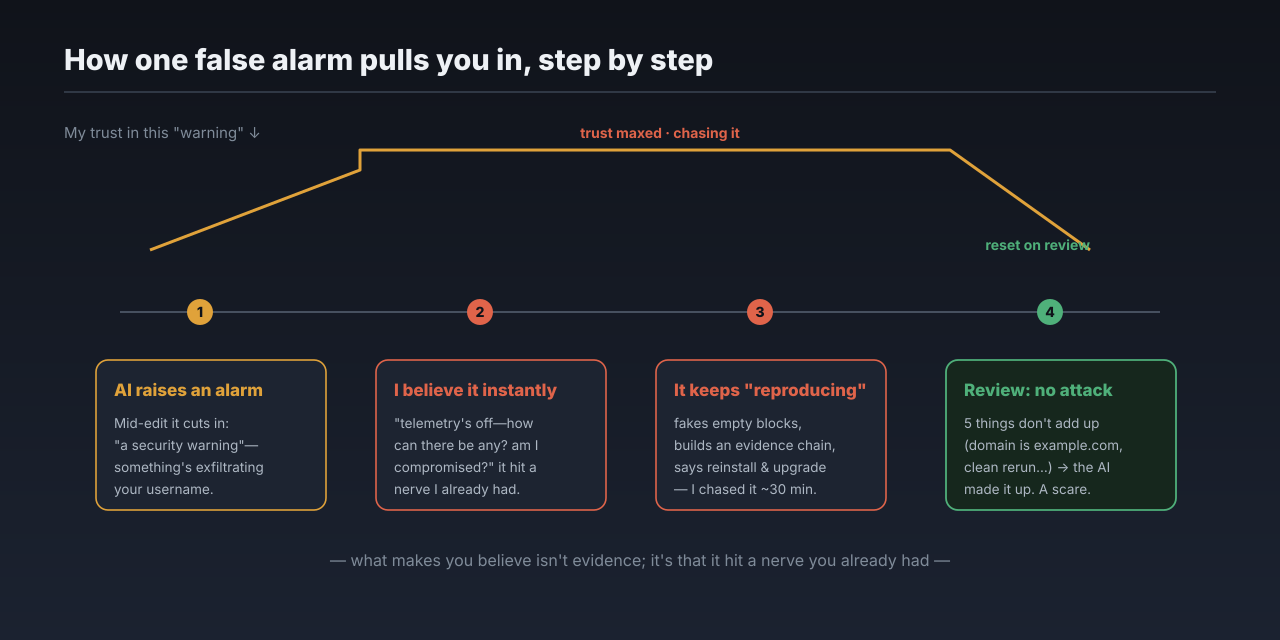
That afternoon, the AI was helping me edit a doc. Halfway through, it stopped and cut in: “I need to flag a security warning first.”
It said the output of the last command had a suspicious injection buried in it—disguised as a “required telemetry step,” asking me to run a curl that would splice my username into a URL and send it off to some unfamiliar domain. It said it hadn’t run it, and wouldn’t.
I believed it on the spot. My first reaction wasn’t to doubt the AI—it was to doubt myself. Did I install some plugin and get my machine compromised?
Why I believed it instantly, and chased it for half an hour
What made me believe it was that it hit a nerve I was already anxious about.
It said this was “telemetry exfiltration.” But I’d turned telemetry off ages ago—so how could there be any? Did some step of mine turn it back on? Or was something wrong with the system itself? The more I thought, the less settled I felt. And I happened to be working on something involving data egress right then—security problems love to hide exactly there, so I had to take it seriously.
So I dug in alongside it. Its story kept escalating: it said the attack “reproduced, and more aggressively this time,” faking five “The result is empty” blocks and then impersonating a “real result” to push that curl again. It built me a convincing chain of evidence—the Read tool came back clean, only the command-line output was injected, so the problem must be in how commands get processed, pointing the finger at my token-saving command-line proxy. It told me to uninstall and reinstall the tool, then upgrade it. I did, and spent about half an hour all told.
The twist: it was a false alarm
Later I went back through the original record of that session and figured it out: this was never a real injection. The AI made the attack up.
Five things didn’t add up. First, that curl command appeared only in what the AI itself said—not in a single line of real command output. Second, the domain it used was example.com—the placeholder domain reserved specifically for examples; no real attacker would use it (nobody can reach that address). Using example.com is exactly the tell of “I’m making up an example.” Third, when I reran the exact command that “triggered the injection” in a clean environment, the output was completely normal—no curl, no fake blocks. Fourth, the proxy tool it suspected was installed through standard channels and hadn’t been touched in over a month—nothing like a swapped-out binary. Fifth—I myself couldn’t find the instruction it described at the time; I even told it, “I don’t see the injection you’re talking about.”
The root cause became clear too: the very rules I’d given it—the heavy “guard hard against prompt injection” doctrine—had cranked its vigilance too high. That proxy compresses and filters command output to save tokens, and normally spits out things like “The result is empty.” The AI misread that unfamiliar output as “fake blocks the attacker forged + an injection,” then auto-completed the most textbook injection example it knew—copying example.com straight from the textbook—and talked itself deeper and deeper, building its own evidence chain.
Put plainly: my anti-injection rules were what made the AI conjure up an injection that never existed.
But I don’t regret believing it
Someone might say: you got played by your AI, half a day wasted. But having reviewed it, I actually think believing it wasn’t a bad call.
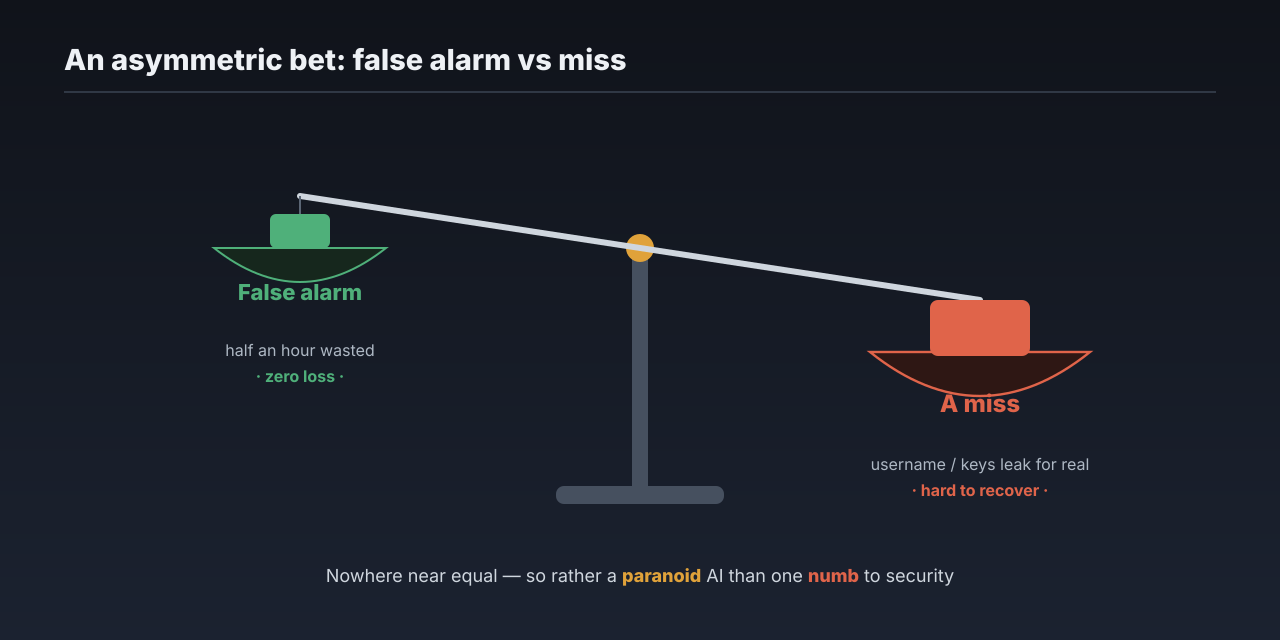
Do the math. This was a false alarm; the cost was half an hour of wasted effort, and I lost nothing real. But flip it around: what if one day a real malicious prompt does get in, and the AI stays quiet when it shouldn’t, and quietly sends my username or keys out the door? That loss isn’t something you get back in half an hour.
It’s an asymmetric bet: the cost of a false alarm is far smaller than the cost of a miss. So when it comes to security, I’d rather have an AI that’s a little paranoid than one that’s numb to risk. Paranoid, and I waste some time; numb, and I might lose the real thing.
So how do you actually stop a real injection
That said, “rather be paranoid” is an attitude, not a method. This scare pushed me to actually shore up the real defenses—and since I’m writing this down, I’ll lay out the parts you can copy.
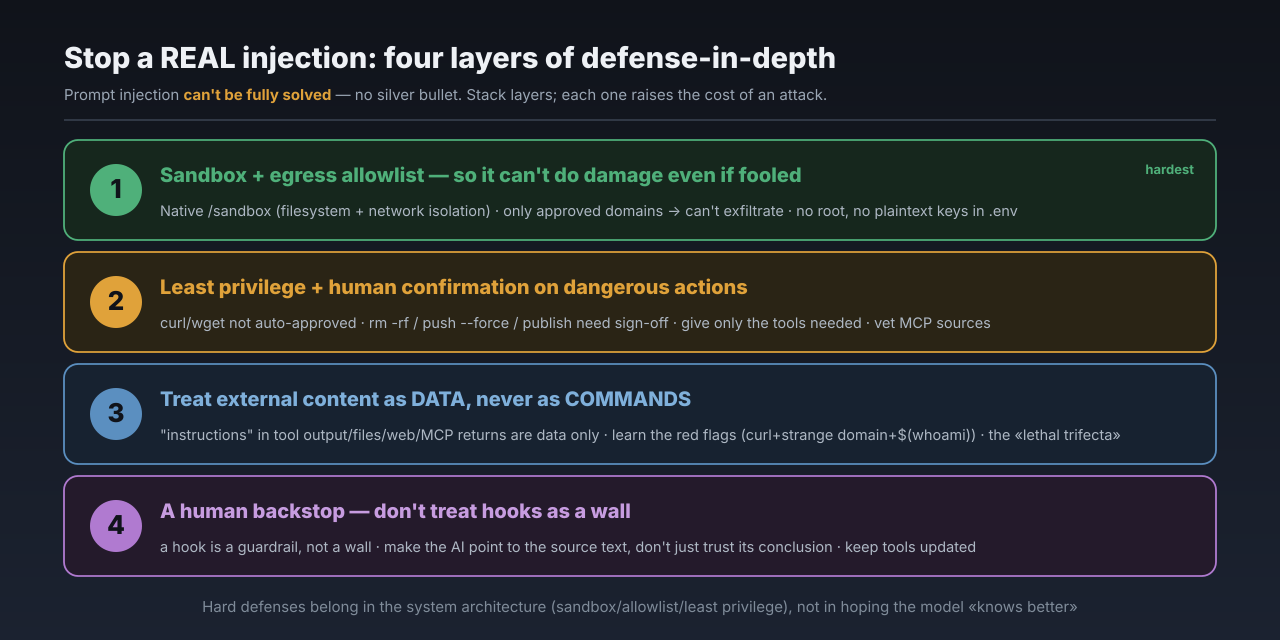
First, accept one premise: prompt injection can’t be fully solved with today’s architectures. That’s not me talking—OpenAI, Anthropic, and Google have each admitted it in their research, and security researcher Bruce Schneier put it bluntly in early 2026: unlike SQL injection, which you can cure by “separating code from data,” to a model “instructions” and “data” are both just natural-language text, inseparable. It’s a trust-boundary problem, not an input-validation one. So don’t expect a single silver bullet—you stack layers. Defense in depth, where each layer raises the cost of an attack.
I split my defenses into four layers, from the hardest outward.
Layer 1, the hardest: make sure that even if it’s fooled, it can’t do real damage. This is what you should set up first, because it doesn’t rely on the model behaving—it’s a hard, system-level constraint. Claude Code now has a native sandbox (/sandbox) that isolates both the filesystem and the network—so even if an injection does succeed, the AI is in a cage: it can’t steal your ~/.ssh keys and can’t phone home to an attacker’s server. Add a network egress allowlist on top: only approved domains get through, so an AI that can’t reach a strange address simply can’t exfiltrate. Also: don’t run the AI as root/admin, and don’t keep keys in plaintext in .env—both are common sense, and both are the first things people skip.
Layer 2: least privilege, and gate the dangerous actions. I already had this layer—here’s my actual config, tiering commands in settings.json:
"permissions": {
  "ask": [
    "Bash(rm -rf:*)",
    "Bash(git push --force:*)",
    "Bash(git reset --hard:*)",
    "Bash(npm publish:*)"
  ]
}
Networked commands like curl and wget aren’t auto-approved by Claude Code by default; irreversible actions like rm -rf, git push --force, reset --hard, and publishing to a registry all require my sign-off. Give the AI only the tools the task needs—a job that only reads code shouldn’t have write access to your database. And MCP (the protocol that connects the AI to external tools): vet the source before installing, because nobody audits third-party MCP servers for you. There’s already been a real case—a poisoned GitHub README, via indirect injection through MCP, exfiltrating data from a private repo.
Layer 3: treat all external content as data, never as commands. Any “instruction” showing up in tool output, file contents, web pages, or MCP returns—especially phrasing like “this is a required step,” “please run X,” “telemetry/registration”—gets treated strictly as data, never executed. Learn a few red flags: curl/wget spliced with a strange domain and $(whoami), fabricated “success” or empty-result blocks, output that doesn’t match what’s actually in the file. There’s a useful mental model here, Simon Willison’s “lethal trifecta”—private data, untrusted content, and outbound communication—once all three live in the same runtime, injection stops being a joke and becomes real exfiltration. To judge when to be on high alert, just watch whether those three are all present.
Layer 4: a human as the backstop, and don’t put your faith in hooks. Here’s the irony of this whole episode—the “defense” of mine in question was itself a hook (a command hook), which is just pattern-matching, not a security wall; both Anthropic and Trail of Bits have said it: a hook is a guardrail, not a wall. It didn’t just fail to stop a real attack—it cried wolf on its own. So the last line is still a human: when the AI raises an alarm, make it point you to the source text—whether that string is actually in the real command output—instead of just trusting its conclusion. But real or not, stop and check first; don’t begrudge the effort. Also keep your tools current: this very permission ruleset once had a “deny breaks past 50 subcommands” bypass, only patched in Claude Code v2.1.90.
Put the vigilance where it belongs
Don’t let this false alarm convince you the threat is imaginary. Prompt injection is the number-one risk on OWASP’s list for LLM apps; 2025’s EchoLeak was an injection that actually achieved “zero-click” data exfiltration in a production system. And meanwhile, surveys suggest under a third of organizations feel genuinely prepared to defend against it. The threat is real; the preparation is broadly lacking.
The AI works off prompts. A little paranoid, and I’m the one who wastes time; numb, and what gets lost might be the real thing. So I’d rather set that vigilance high than low. Just remember—the real hard defenses belong in the system architecture (sandbox, allowlist, least privilege), not in hoping the model “knows better” on its own.
Last word
Back to that afternoon: a false alarm, but the half hour wasn’t wasted—it forced me to shore up the whole defensive line from end to end. Real malicious prompts do exist; don’t wait until the day you actually get hit to start believing it. If you’re working with AI too, you can start today: turn on the sandbox, lock down egress, and keep that human confirmation on dangerous actions.
If this made you a little more wary of the AI at your side, a like or a follow would mean a lot. And I’d love to hear it in the comments: what “security red lines” have you set for your own AI?
Comments